| pyvgx.Graph Arc Methods | Description |
|---|---|
Establish a relationship between two vertices |
|
Remove one or more arcs incident on a specified vertex. |
|
Auto-increment relationship value |
|
Auto-accumulate a floating point relationship value |
1. pyvgx.Graph.Connect()
Establish explicit connection(s) between vertices by inserting one or more directed edges (arcs) from the initial vertex to one or more terminal vertices.
1.1. Syntax
pyvgx.Graph.Connect( initial, arc, terminals[, lifespan[, condition[, timeout ]]] ) -> number1.2. Parameters
| Parameter | Type | Default | Description |
|---|---|---|---|
initial |
str or pyvgx.Vertex |
Unique ID string or vertex instance opened for writable access |
|
arc |
Arc specification for the connection from initial to a terminal |
||
terminals |
term1 or [term1, …, termn] where termi is str or pyvgx.Vertex |
Unique ID string(s) or vertex instance(s) opened for writable access, supplied as list or singleton |
|
lifespan |
int |
-1 (infinite) |
Number of seconds arc will exist until it automatically expires |
condition |
None |
Perform the connect operation only when this condition is met |
|
timeout |
int |
0 |
Timeout (in milliseconds) for acquiring writable access to both initial and terminal vertices |
1.3. Return Value
This method returns a positive integer indicating the number of arcs created. Only new arcs contribute to the returned count. Updating the value of an existing arc is not considered a new arc.
The return value may be greater than the number of terminals if the operation implicitly creates multiple arcs, which occurs when lifespan is specified and/or AutoArcTimestamps( True ) has been called. (See Arc Timestamps.)
1.4. Remarks
An arc is a directed edge starting at the initial vertex and ending at the terminal vertex, and represents an explicit connection between the two vertices.
When connecting two vertices the arc parameter can take one of several forms depending on the type of connection to establish. In the graph structure an arc always has three elements. The arc parameter may specify all, some, or none of these elements according to the arc insertion syntax specification. Unspecified arc elements receive default values.
1.4.1. Arc Elements
The arc parameter is specified as one of these tuples:
-
() -
( relationship ) -
( relationship, modifier ) -
( relationship, modifier, value )
The three arc elements are:
-
relationship: User-defined string value indicating the nature of the connection, such as "likes", "clicked", "purchased", "visited", "has", "is_a", etc. There is an upper limit to the number of unique relationship types supported per graph instance. (Currently this limit is 15,616.) Default relationship is
"__related__". -
modifier: One of several integer constants defining the type of the value associated with the arc. Some modifiers also define additional arc behavior, such as automatic value increment and automatic arc deletion at a future expiration time. Default modifier is
M_STAT. -
value: Integer or floating point value associated with the arc. Valid numeric range depends on the modifier. The default modifier M_STAT implies value=1 and does not allow a value to be set. Default values for all other modifiers vary depending on the modifier.
We sometimes use the notation
-
(A)-[rel,mod,val]->(B)
to describe the connection shown:
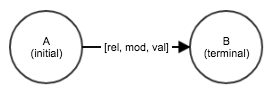
This depicts an arc from vertex A to vertex B with relationship rel, modifier mod, and value val.
| Creating an arc from initial A to terminal B also creates a hidden, implicit reverse arc from B to A. This makes it possible to traverse the graph in any direction. If only forward traversal is ever needed by queries the M_FWDONLY modifier bitmask may be used to suppress creation of the implicit reverse arc, which may save memory. |
1.4.1.1. Arc Elements Example
from pyvgx import *
g = Graph("graph")

# A has unspecified relation to B
g.Connect( "A", (), "B" )
g.Connect( "A", None, "B" ) # equivalent notation

# C -[to]-> D
g.Connect( "C", ("to"), "D" )
g.Connect( "C", "to", "D" ) # equivalent notation

# E -[freq, M_CNT]-> F
g.Connect( "E", ("freq", M_CNT), "F" )

# G -[score, M_FLT, 4.56]-> H
g.Connect( "G", ("score", M_FLT, 4.56), "H" )
1.4.2. Multiple Arc
When more than one arc connects two vertices we call it a multiple arc (as opposed to simple arc for a single connection.) A multiple arc can contain any number of individual arcs, but any combination of relationship type and modifier can only occur once. Adding another arc with the same relationship and modifier as an existing arc will overwrite the existing arc.
We sometimes refer to a multiple arc with n individual arcs as a n-multiple.
For instance, to represent that person P has visited country C four times in their life, the first time in 1965, and spent a total of 45 days there, we need a 3-multiple arc from P to C. We can define out data model such that M_CNT represents "number of times", M_INT represents "first year", and M_FLT represents "total duration", like this:
-
(P)-[ visited, M_CNT, 4 ]->(C) -
(P)-[ visited, M_INT, 1965 ]->(C) -
(P)-[ visited, M_FLT, 45.0 ]->(C)
Alternatively, if we want all values to be of type M_INT we could use different relationship types, like this:
-
(P)-[ visited_num, M_INT, 4 ]->(C) -
(P)-[ visited_first, M_INT, 1965 ]->(C) -
(P)-[ visited_total_days, M_INT, 45 ]->(C)
The choice of relationship type and modifier is arbitrary and application defined, and does not matter as long as the modifier is suitable for the value type and the number of unique relationships does not exceed the maximum limit (15,616) per graph.
|
Multiple arcs have additional overhead in terms of memory usage and internal structure, which can have impact on query performance. This is due to the data structures used to implement arcs. Bottom line: Be aware of the impact of introducing multiple arcs in your data model, and benchmark to arrive at an optimal design. |
1.4.2.1. Multiple Arc Example
from pyvgx import *
g = Graph("graph")

# Alice likes Colombia. She has visited 4 times, the first time
# was in 1965, and she has spent a total of 45 days there.
# She knows 7 people who live there.
g.Connect( "Alice", ("likes"), "Colombia" )
g.Connect( "Alice", ("visited",M_CNT,4), "Colombia" )
g.Connect( "Alice", ("visited",M_INT,1965), "Colombia" )
g.Connect( "Alice", ("visited",M_FLT,45.0), "Colombia" )
g.Connect( "Alice", ("knows",M_INT,7), "Colombia" )
1.4.2.2. Multiple Arc Memory Overhead
The memory cost of moving from simple to multiple arc is non-linear. In practice you can expect the following memory increase for a n-multiple arc compared to the simple arc baseline:
| n | Raw memory usage compared to simple arc | Memory cost multiplier per arc |
|---|---|---|
1 |
1x (baseline) |
1.0 (baseline) |
2 |
6x |
3.0 |
3 - 6 |
12x |
4.0 - 2.0 |
7 - 12 |
18x |
2.6 - 1.5 |
13 - 24 |
30x |
2.3 - 1.25 |
→ N |
→ Nx |
→ 1.0 |
As can be seen above the relative memory cost is high for a low-n multiple, and then moves lower back towards 1.0 in the limit as n grows.
1.4.2.3. Multiple Arc Query Performance Overhead
The impact on query performance when moving from simple to multiple arc is non-linear. In practice you can expect the following increase in execution time when traversing n-multiple arcs compared to a simple arc baseline:
| n | Query execution time compared to simple arc | Execution cost multiplier per arc |
|---|---|---|
1 |
1x (baseline) |
1.0 (baseline) |
2 |
10x |
5.0 |
3 - 6 |
12x |
3.7 - 2.2 |
7 - 12 |
17x + |
2.4 - 1.6 |
13 - 24 |
22x + |
1.5 − |
→ N |
→ Nx |
→ 1.0 |
As can be seen above the relative query execution cost per arc is very high for a low-n multiple, and then moves lower back towards 1.0 in the limit as n grows.
1.4.3. Arc Timestamps
Arcs may be encoded with up to three timestamps, representing the number of seconds since 1970, using the following modifiers:
Arcs with these modifiers may be created explicitly by specifying the desired timestamp modifier in the arc parameter. Timestamped arcs may also be created automatically using the lifespan parameter to specify the number of seconds the arc should exist before automatic deletion. Arcs created with lifespan receive all three timestamps in addition to the specified modifier, and therefore become 4-multiples.
Explicit use of timestamp modifiers is not allowed when lifespan is specified.
Automatic assignment of creation and modification time is also possible without using the lifespan parameter by including the M_AUTOTM bitmask when creating the arc, or when globally configured with pyvgx.AutoArcTimestamps( True ) prior to calling Connect(). After so configured Connect() will always produce 3-multiples including the M_TMC, M_TMM and specified modifier.
Arc modification time M_TMM is only automatically updated when AutoArcTimestamps( True ) is in effect. Otherwise the modification time must be explicitly updated, even after the arc was originally created with lifespan.
|
| Being multiple arcs, timestamped arcs have a cost both in terms of memory usage and query efficiency. Be sure to understand the overall system impact before designing a model using timestamped arcs. |
1.4.3.1. Arc Timestamps Example
from pyvgx import *
import time
g = Graph("graph")
AutoArcTimestamps( True )

# Alice calls Bob. This also records the creation time of the
# "calls" relationship, which is also the modification time.
g.Connect( "Alice", ("calls",M_CNT), "Bob" ) # -> 3

# Wait a bit
time.sleep(5)

# Alice calls Bob again. The modification time is updated
# but the creation time is unchanged.
g.Connect( "Alice", ("calls",M_CNT), "Bob" ) # -> 0

g.Neighborhood( "Alice", fields=F_AARC )
# -> ['( Alice )-[ calls <M_TMC> 1680122000 ]->( Bob )',
#     '( Alice )-[ calls <M_TMM> 1680122005 ]->( Bob )',
#     '( Alice )-[ calls <M_CNT> 2 ]->( Bob )'
#    ]
1.4.3.2. Arc Expiration
Setting arc expiration, either explicitly via modifier M_TMX or implicitly via the lifespan parameter, results in automatic arc deletion at the specified future time. Deletion affects the entire subset of the multiple arc sharing the same relationship type.
Arc expiration occurs automatically in the background, provided that 1) the system was initialized with events=True (the default); 2) the TTL processor has not been disabled; and 3) the graph has not been set readonly.
1.4.3.3. Arc Expiration Example
from pyvgx import *
g = Graph("graph")

# A temporary boost from a Query to an Item, which is
# automatically removed after the expiration period.
g.Connect( "QryA", ("boost",M_FLT,100), "Item1", lifespan=3600 )
1.4.4. Conditional Connect
When the condition parameter is specified Connect() will create or update the arc only when the condition is met. The condition is expressed using arc filter syntax. The arc filter is applied to existing arc(s) between initial and termi (in terminals.)
1.4.4.1. Conditional Connect Example
from pyvgx import *
g = Graph("graph")

# A-[score,3.5]->B
g.Connect( "A", ("score",M_FLT,3.5), "B" ) # -> 1

# Condition not true
g.Connect( initial="A",
           arc=("count",M_CNT),
           terminal="B",
           condition=("score",D_OUT,M_FLT,V_LT,2.0)
         ) # -> 0

# Condition true
# A-[count,1]->
g.Connect( initial="A",
           arc=("count",M_CNT),
           terminal="B",
           condition=("score",D_OUT,M_FLT,V_GT,2.0)
         ) # -> 1
1.4.5. Connect Timeout
When connecting two vertices (initial and term1) specified by their identifiers and those vertices are not already write-locked by the current thread, the timeout parameter may be specified to allow Connect() to block a maximum number of milliseconds while waiting to acquire both vertices.
1.4.5.1. Connect Timeout Example
from pyvgx import *
g = Graph("graph")

# Try connect X-[to]->Y without blocking
g.Connect( "X", "to", "Y" )

# Try connect X-[to]->Y, block for up to 1.0 second
g.Connect( "X", "to", "Y", timeout=1000 )

# Try connect X-[to]->Y, block indefinitely
g.Connect( "X", "to", "Y", timeout=-1 )
2. pyvgx.Graph.Disconnect()
Remove one or more arcs incident on a specified vertex.
2.1. Syntax
pyvgx.Graph.Disconnect( id[, arc[, neighbor[, timeout ]]] ) -> number_of_removed_arcs2.2. Parameters
| Parameter | Type | Default | Description |
|---|---|---|---|
id |
str or pyvgx.Vertex |
Unique ID string or vertex instance opened for writable access. This is the vertex whose inarcs and/or outarcs (or subset thereof) should be removed. |
|
arc |
None |
Arc specification for arcs to be removed. By default all arcs are removed. |
|
neighbor |
None |
Condition for terminal vertex for arcs to be removed. No condition by default. NOTE: Exact ID match is currently the only supported vertex condition. |
|
timeout |
int |
0 |
Timeout (in milliseconds) for acquiring writable access to anchor vertex, and optionally for the neighbor vertex if vertex condition is specified. |
2.3. Return Value
This method returns the number of arcs removed.
2.4. Remarks
One or more arcs incident on the specified vertex are removed according to the specified arc condition and vertex condition. This method can be used to remove both outarcs and inarcs. The direction is specified as part of the arc condition.
The default behavior if no conditions are specified is to remove all arcs, making the vertex an isolated vertex.
2.5. Example
from pyvgx import *
g = Graph("graph")

g.Connect( "Alice",   ("likes",M_INT,10),     "Coffee" )
g.Connect( "Bob",     ("likes",M_INT,20),     "Coffee" )
g.Connect( "Charlie", ("likes",M_INT,30),     "Coffee" )
g.Connect( "Coffee",  "is_a",                 "Beverage" )
g.Connect( "Coffee"   ("sold_by",M_FLT,1.89), "ShopX" )
g.Connect( "Coffee",  ("sold_by",M_FLT,2.29), "ShopY" )

# -> 0, no arcs removed
g.Disconnect( "Coffee", "roasted_by" )

# -> 1, removes Coffee-[sold_by,M_FLT,1.89]->ShopX
g.Disconnect( "Coffee", "*", "ShopX" )

# -> 1, removes Alice-[likes,M_INT,10]->Coffee
g.Disconnect( "Coffee", ("likes",D_IN,M_INT,V_LT,15) )

# -> 4, removes all other arcs incident on Coffee
g.Disconnect( "Coffee" )
3. pyvgx.Graph.Count()
Auto-increment relationship value with type M_CNT of arc going from initial to terminal vertex.
3.1. Syntax
pyvgx.Graph.Count( initial, relationship, terminal[, delta[, timeout ]] ) -> count3.2. Parameters
| Parameter | Type | Default | Description |
|---|---|---|---|
initial |
str or pyvgx.Vertex |
Unique ID string or instance opened for writable access |
|
relationship |
str |
Relationship of arc whose value will be incremented |
|
terminal |
str or pyvgx.Vertex |
Unique ID string or instance opened for writable access |
|
delta |
int |
1 |
Increment the arc value by this amount. If the arc does not exist it is created and initialized to the specified value. |
timeout |
int |
0 |
Timeout (in milliseconds) for acquiring writable access to both initial and terminal vertices |
3.3. Return Value
This method returns the updated count value after the increment has been applied.
3.4. Remarks
Perform a counting operation on the arc using the M_CNT modifier to automatically increment the arc value by a specified amount. The delta parameter allows increments other than 1. Negative delta values will decrement the arc value.
If the relationship does not already exist it is created and initialized with a value equal to the specified delta amount.
If either vertex does not already exist it is created as a typeless vertex.
3.5. Examples
from pyvgx import *
g = Graph("graph")


# -> 1, creates both Alice and Bob and the new
# arc Alice-[called,M_CNT,1]->Bob
g.Count( "Alice", "called", "Bob" )

# -> 2, increments and returns updated arc value
g.Count( "Alice", "called", "Bob" )

# -> 7, increments by 5
g.Count( "Alice", "called", "Bob", 5 )

# -> 7, no increment, just return current arc value
g.Count( "Alice", "called", "Bob", 0 )

# -> 0, decrements by 7, resetting counter to 0
g.Count( "Alice", "called", "Bob", -7 )

# -> -5, decrements by 5
g.Count( "Alice", "called", "Bob", -5 )
4. pyvgx.Graph.Accumulate()
Auto-accumulate a floating point relationship value with type M_ACC of arc going from initial to terminal vertex.
4.1. Syntax
pyvgx.Graph.Accumulate( initial, relationship, terminal[, delta[, timeout ]] ) -> accumulation4.2. Parameters
| Parameter | Type | Default | Description |
|---|---|---|---|
initial |
str or pyvgx.Vertex |
Unique ID string or instance opened for writable access |
|
relationship |
str |
Relationship of arc whose value will be accumulated |
|
terminal |
str or pyvgx.Vertex |
Unique ID string or instance opened for writable access |
|
delta |
float |
1.0 |
Add this amount to the arc value. If the arc does not exist it is created and initialized to the specified value. |
timeout |
int |
0 |
Timeout (in milliseconds) for acquiring writable access to both initial and terminal vertices |
4.3. Return Value
This method returns the updated accumulator value after the addition of delta amount has been applied.
4.4. Remarks
Perform an accumulating operation on the arc value using the floating point M_ACC modifier to automatically add a specified delta amount to the arc value. Negative delta values will subtract from the arc value.
If the relationship does not already exist it is created and initialized with a value equal to the specified delta amount.
If either vertex does not already exist it is created as a typeless vertex.
4.5. Example
from pyvgx import *
g = Graph("graph")

# Alice's bank account:
# -> 100.0, creates both Alice and USD and the new
# arc Alice-[has,M_ACC,100.0]->USD
g.Accumulate( "Alice", "has", "USD", 100.0 )
g.Accumulate( "Alice", "has", "USD" )            # -> 101.0
g.Accumulate( "Alice", "has", "USD", 41.99 )     # -> 142.99
g.Accumulate( "Alice", "has", "USD", -200 )      # -> -57.01