VGX Server is a self-contained platform for building plugin-based PyVGX services exposed via HTTP endpoints. Everything is implemented in C except for service bootstrap and plugin code which execute in the Python interpreter. Multiple VGX Server instances may be connected to form a scalable system.
1. Component Overview
- Request Engine
-
Request Engine is a fully asynchronous, multithreaded socket server built directly on the operating system’s standard socket API. It currently supports the HTTP protocol, accepting methods
GET,POSTandHEAD. - Plugin Adapter
-
Plugin Adapter allows custom Python code to be installed as plugins which can be invoked via HTTP requests.
Request Engine must be running before plugin requests can be made. Use pyvgx.StartHTTP() or pyvgx.Initialize() to start the socket server.
Plugins are added using pyvgx.system.AddPlugin(), which associates a unique service URI with a Python function. Any number of services may be defined, creating a unique service URI for each plugin function added.
- Graph Engine
-
Graph Engine stores graph data and executes queries.
- Transaction Interconnect
-
Transaction Interconnect is responsible for sending and receiving graph data to and from other VGX Server instances, enabling durable data replication.
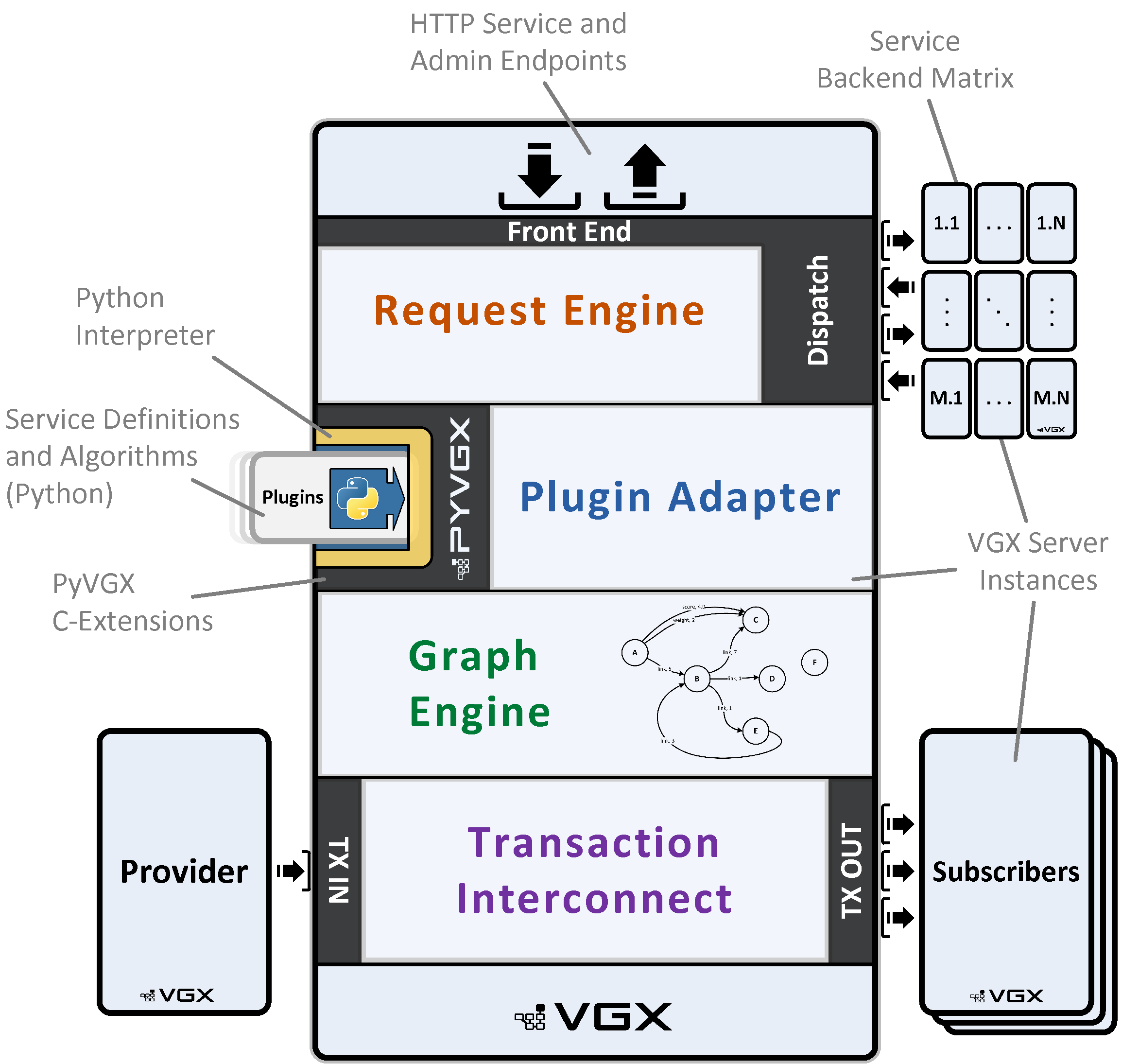
2. Request Engine
Request Engine runs in one of three modes:
- VGX Engine
-
Request Engine receives, executes, and responds to requests by invoking Python functions registered via the engine argument to pyvgx.system.AddPlugin().
Request Engine runs in this mode by default when pyvgx.system.StartHTTP() is called (without the dispatcher argument.)
- VGX Dispatch
-
Request Engine forwards requests to one or more lower level Request Engines whose individual responses are combined into an aggregate response. Requests may be pre-processed before they are dispatched to other Request Engines, and the aggregate response may also be post-processed. Pre and post processors are optionally registered via the pre and post arguments to pyvgx.system.AddPlugin().
Request Engine runs in Dispatcher mode when pyvgx.system.StartHTTP() receives a matrix configuration in the dispatcher argument.
- Reverse Proxy
-
This is a special case dispatch mode where the dispatcher matrix contains a single instance and no pre or post processors are used. A request is simply forwarded to the single instance whose unmodified response is used as the proxy response.
2.1. VGX Dispatch Matrix
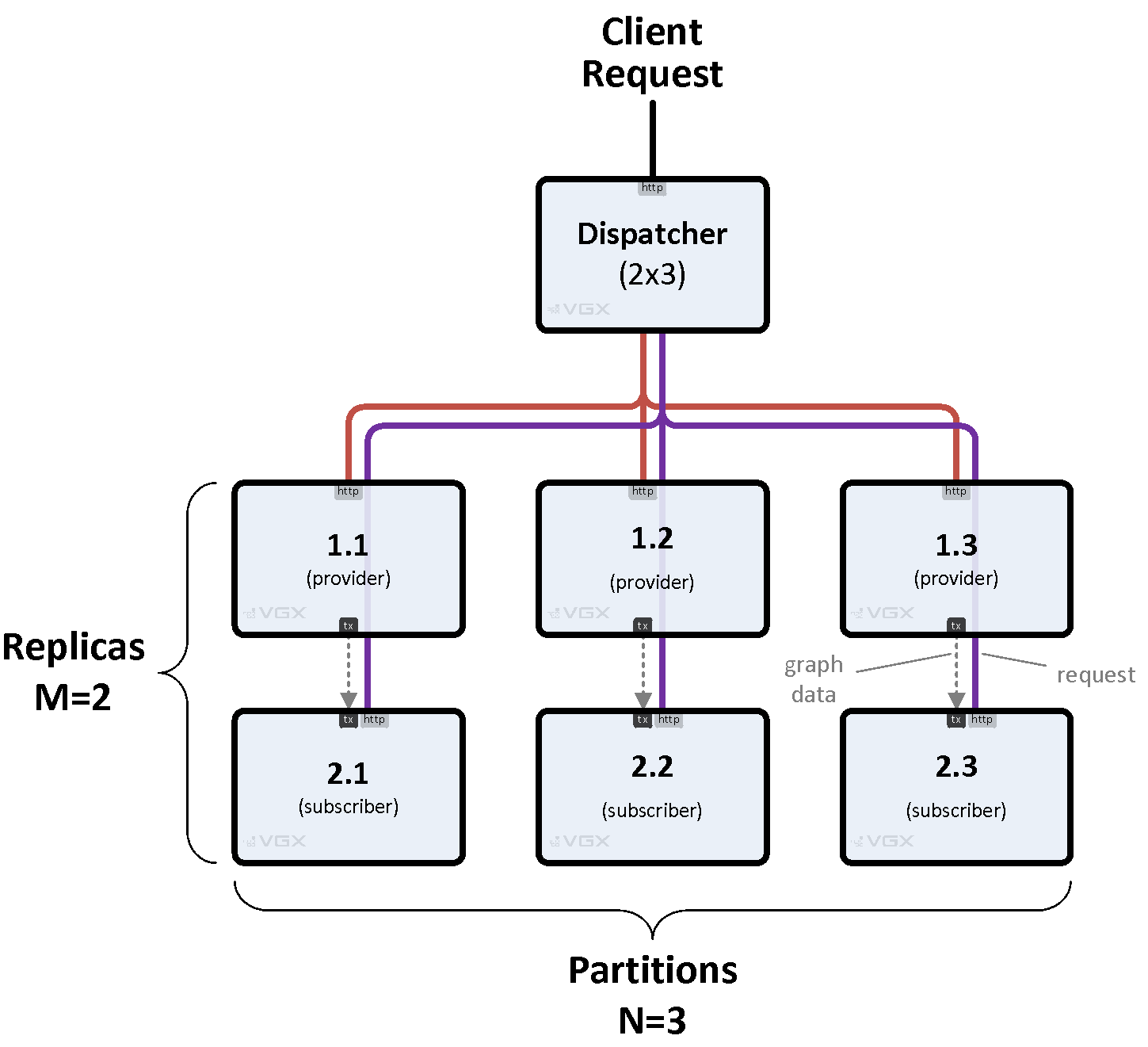
Multiple VGX Server instances can be deployed to form a dispatch matrix. A VGX Dispatch instance acts as the front-end to a set of back-end instances arranged in a rectangular M x N matrix, where M is the number of rows (replicas) and N is the number of columns (partitions). A back-end instance may be another VGX Dispatch instance, or a bottom layer VGX Engine instance.
A request sent to VGX Dispatch is forwarded to exactly one back-end instances per partition. The replica chosen for a given partition depends on the replica priority and the amount of work currently being performed by all replicas in the partition. The selected back-end instances return their individual responses to VGX Dispatch where they are merged.
By default all partitions are included when executing a request. This is the desired behavior for queries that must aggregate responses from all partitions. A specific partition may be targeted when so instructed via plugin code or HTTP headers, which is required when feeding data to a system. In this case the selected replica will be the primary (provider) instance within a set of replicas.
Figure 2, “Basic 2x3 Matrix” shows a simple 2-row, 3-partition matrix served by a single dispatcher. Notice how service requests (http) are separated from transaction data transfer (tx) using different protocols on different ports.
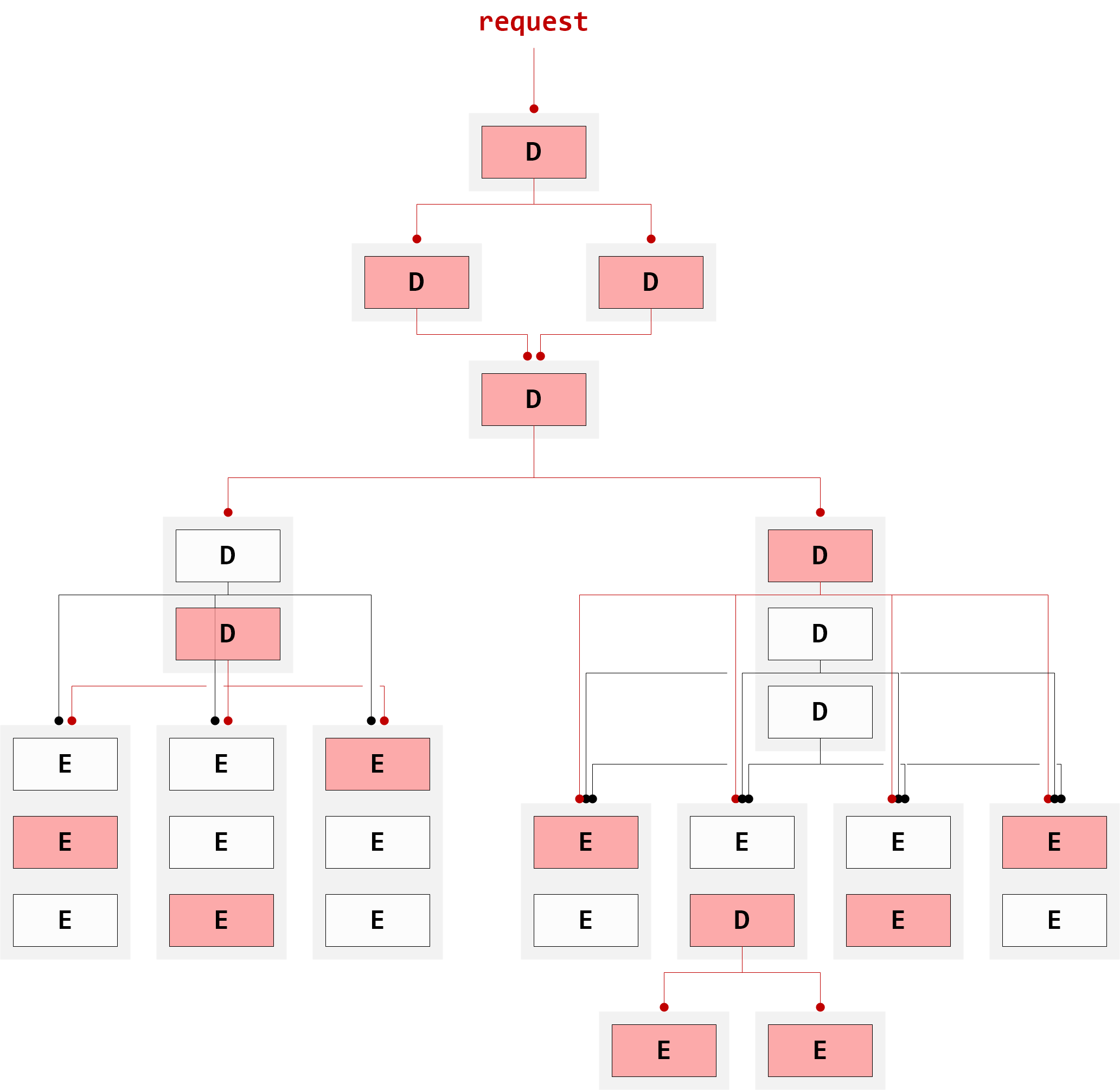
Any topology is possible, as illustrated in Figure 3, “Complex Matrix”. The only constraint is for any given VGX Dispatch instance its matrix of back-ends must be rectangular.
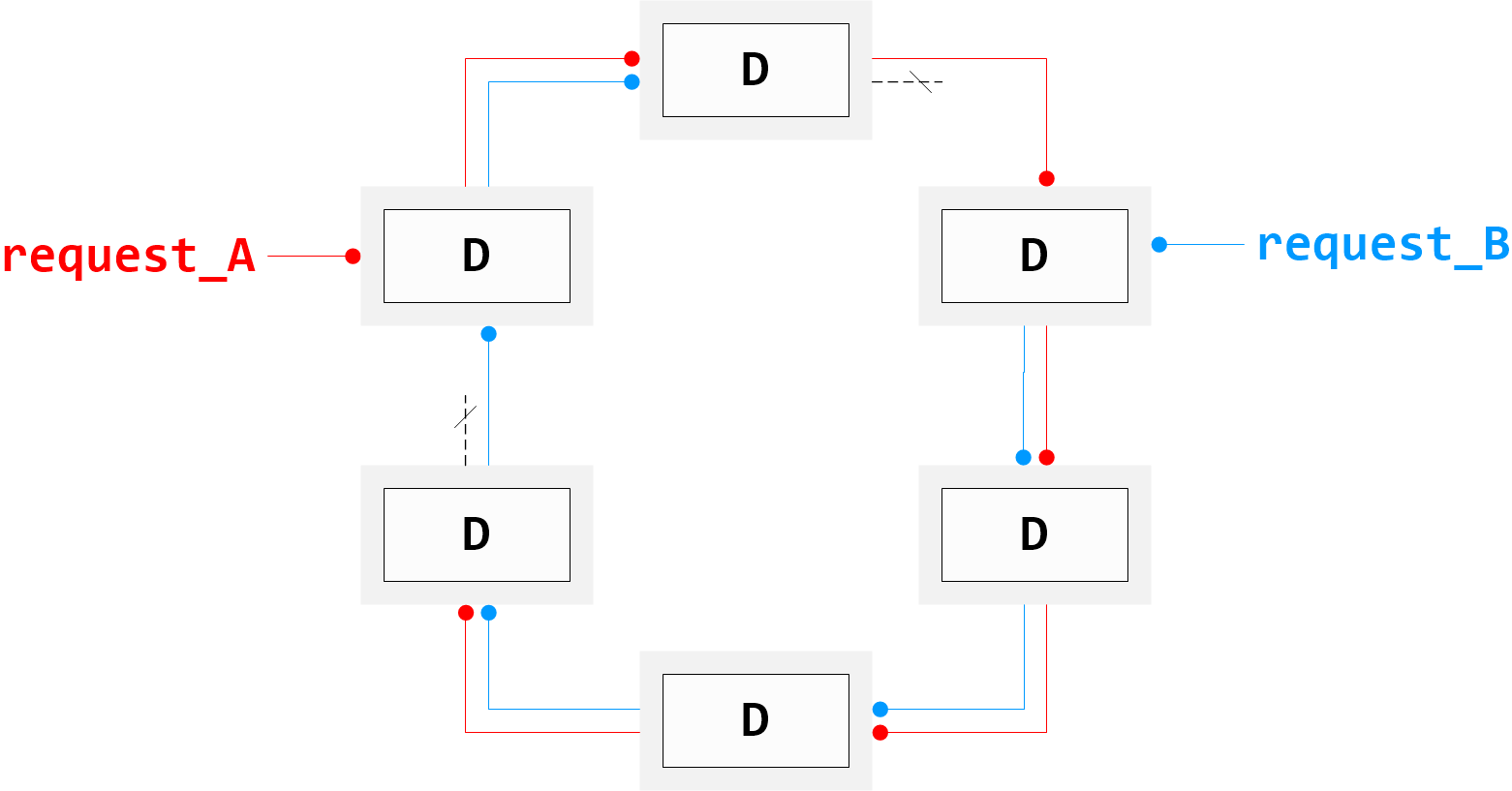
It is also possible to arrange instances in a ring topology as shown in Figure 4, “Ring Matrix”. Such a system allows a request to be sent to any instance, which forwards the request around the ring until the last instance is reached. Responses are aggregated serially and finally returned to the client. Appropriate plugin code must be in place to make sure request propagation terminates at the top-most VGX Dispatch instance.
2.2. Server Ports
VGX Server runs two independent Request Engine servers; Server A and Server B. Server A runs on the port specified with Initialize() or StartHTTP(). Server B runs on port+1.
2.2.1. Main Server A (port)
Server A is the main server used for executing plugin requests.
2.2.2. Admin Server B (port+1)
Server B is used for monitoring and administrative requests.
2.3. Dispatcher Configuration
Request Engine is started in VGX Dispatch mode by passing the dispatcher parameter to StartHTTP(), which is a dict describing the back-end matrix:
# Dispatcher configuration
cfg = {
    'partitions': [
        # Partition 1
        [   {'host': <h_1.1>, 'port': <p_1.1>},
            {'host': <h_2.1>, 'port': <p_2.1>},
            ...,
            {'host': <h_M.1>, 'port': <p_M.1>}
        ],
        # Partition 2
        [   {'host': <h_1.2>, 'port': <p_1.1>},
            {'host': <h_2.2>, 'port': <p_2.2>},
            ...,
            {'host': <h_M.2>, 'port': <p_M.2>}
        ],
        ...,
        # Partition N
        [   {'host': <h_1.N>, 'port': <p_1.N>},
            {'host': <h_2.N>, 'port': <p_2.N>},
            ...,
            {'host': <h_M.N>, 'port': <p_M.N>}
        ]
    ],
    'replicas': [
        # Row 1
        {'channels': <ch_1>, 'priority': <pr_1>},
        # Row 2
        {'channels': <ch_2>, 'priority': <pr_2>},
        ...,
        # Row M
        {'channels': <ch_M>, 'priority': <pr_M>, 'primary': 1}
    ],
    'options' : {
        'allow-incomplete': <bool>
    }
}

# Start server in dispatcher mode
pyvgx.system.StartHTTP( <port>, dispatcher=cfg )
2.3.1. partitions
This defines a M x N matrix of back-end server instances to which we will dispatch requests. The value is a list of lists of dicts, where the outer list represents partitions 1 − N and the inner lists represent replicas 1 − M. Each inner list must contain exactly M dicts identifying the back-end servers in their corresponding matrix positions.
- host
-
Host name or IP address
- port
-
Main server port (Server A)
2.3.2. replicas
These are row parameters, expressed as a list of M dicts whose positions correspond to the inner list dicts of partitions. Row parameters are common to all servers within the same row.
- channels (1-127)
-
Default: 32
Sets an upper limit for the number of socket connections between dispatcher and back-end servers. This setting controls the maximum number of concurrent requests a given row will handle for this dispatcher.
- priority (0-127)
-
Default: 2
Assigns the Base Reference Cost for back-end servers in a given row. Lower values encourage higher utilization of the row. Every request executing inside a back-end server contributes to the server’s Running Execution Cost, which at any point in time equals its Base Reference Cost multiplied by the number of concurrent requests from this dispatcher.
A new request will always be dispatched to the back-end in a replica stack with the lowest Running Execution Cost, and if equal the back-end at the lowest row index m is preferred. A row with priority=0 will never accumulate Running Execution Cost and will continue to receive requests until channel capacity is exhausted.
Running Execution Cost is maintained per back-end, which means a request may be dispatched to different rows for each partition.
Requirement: \( \displaystyle channels \cdot priority <= 127 \) - primary (0 or 1)
-
Default: 1 for first replica, 0 for all others
When 1, designates the (at most one) row where primary requests are sent. Primary requests are those which must be executed on provider VGX Server instances such as data insertion requests, source-of-truth data counter requests, etc.
Primary requests must be made explicitly by setting
pyvgx.PluginRequestattributes in a pre-processor plugin or via HTTP headerx-vgx-partial-target.Partition-specific requests (such as data insertion) are made by setting
pyvgx.PluginRequest.partialorx-vgx-partial-targetto a non-negative value. (Target partition numbers start at 0.)All-partitions requests to the primary row are made by setting
pyvgx.PluginRequest.primaryto 1.
2.3.3. options
General dispatcher settings are specified here.
- allow-incomplete (True or False)
-
Default: False
False: All partitions must have at least one replica available to serve requests. If one or more partitions are unavailable the dispatcher will respond with error503 Partition(s) down.True: Requests are allowed to complete when at least one partition is available. Responses from the available partitions will be aggregated and returned on a best-effort basis. If no partitions are available the dispatcher will respond with error503 All partitions down.
2.4. pyvgx.system Request Engine Management
2.4.1. StartHTTP
pyvgx.system.StartHTTP( port[, ip[, prefix[, servicein[, dispatcher]]]] )-
Start VGX Server HTTP service.
port: Two independent servers are started on port and port+1, enabling plugin execution and remote system monitoring. Plugin execution requests should be made on port, and all other requests should be made on port+1.
ip: Optionally identify the server’s ip address
prefix: An optional service prefix may be specified, which creates URI aliases for plugins, files placed under
vgxroot/WEB-ROOT, and certain built-in artifacts:http://host:port/prefix/plugin/servicename?parametershttp://host:port/prefix/file-under-WEB-ROOThttp://host:port/prefix/jquery.jsservicein: The server may optionally be started Service-OUT by passing servicein=
False. (Default isTrue.) Plugin requests will return HTTP code503while in Service-OUT mode. Usepyvgx.system.ServiceInHTTP()later to enable plugin execution.dispatcher: The server may be configured as a dispatcher by passing a non-empty configuration dict in this parameter.
2.4.3. RestartHTTP
2.4.4. DispatcherConfig
2.4.5. ServiceInHTTP
pyvgx.system.ServiceInHTTP( [service_in] )-
Service-IN or Service-OUT a running HTTP service. If service_in is
Falseor0the running HTTP service will be made unavailable for plugin execution. Plugin execution is enabled when service_in isTrueor non-zero (the default.)
2.4.6. ServerMetrics
2.4.9. ServerPrefix
pyvgx.system.ServerPrefix()-
Return the service prefix specified to
StartHTTP(), or None if no prefix is used.
2.4.10. ServerAdminIP
2.4.11. RequestRate
pyvgx.system.RequestRate()-
Return the current request rate for HTTP Server A running on base port.
2.5. Request Engine Limits
3. Request and Response
3.1. HTTP Request
Request Engine accepts standard HTTP 1.1 requests.
3.1.1. HTTP Methods
Supported methods are GET, POST, HEAD, and OPTIONS.
3.1.1.1. HTTP GET
Supported for all request types.
GET /path HTTP/1.1\r\n
Header1: Field1\r\n
Header2: Field2\r\n
\r\n
3.1.1.2. HTTP POST
Supported for plugin requests.
POST /path HTTP/1.1\r\n
Header1: Field1\r\n
Header2: Field2\r\n
Content-Length: 14\r\n
\r\n
Sample content
3.1.1.3. HTTP HEAD
Supported for file resource and builtin artifact request.
HEAD /path HTTP/1.1\r\n
\r\n
3.1.1.4. HTTP OPTIONS
Supported for all request types.
OPTIONS /path HTTP/1.1\r\n
\r\n
3.1.2. Recognized HTTP Request Headers
The following HTTP headers are recognized and acted upon by the HTTP Server.
-
Accept -
Content-Type -
Content-Length -
X-VGX-Partial-Target -
X-VGX-Builtin-Min-Executor -
X-VGX-Bypass-SOUT
Other headers may be sent and acted upon by custom plugins. (See optional headers argument passed to plugin functions.)
3.1.2.1. Accept
Accept: mediatype
Specify mediatype of response returned from plugin request. Three mediatypes are currently supported:
-
application/json(default)
Render plugin response object as JSON -
text/plain
Render plugin response asrepr( object ) -
application/x-vgx-partial
Internal format used between dispatcher and back-end matrix
3.1.2.2. Content-Type
Content-Type: mediatype
Specify mediatype of content in POST requests
3.1.2.3. Content-Length
Content-Length: length
Specify length in bytes of content in POST requests
3.1.2.4. X-VGX-Partial-Target
X-VGX-Partial-Target: partition
Target partition for this request when forwarded to VGX Dispatch back-end matrix. See request.partial.
3.1.2.5. X-VGX-Builtin-Min-Executor
X-VGX-Builtin-Min-Executor: queueN
For internal use. Specify queueN (max 3) of the lowest internal dispatch queue to use for the request, limiting which executor threads are allowed to handle the request.
3.1.2.6. X-VGX-Bypass-SOUT
X-VGX-Bypass-SOUT: bypass
Override service S-OUT when bypass is 1. Requests with this header will be executed regardless of service S-IN/S-OUT state.
3.1.3. Plugin Execution Request
The Python plugin function to execute and its parameters are determined by the service URL path.
To execute servicename, use HTTP request path /vgx/plugin/servicename?parameters.
If an engine or pre-processor named servicename has been added with system.AddPlugin() its registered function is called. In Engine mode the registered engine function is called. In Dispatch mode the registered pre function is called.
In Engine mode there must be an engine matching servicename, otherwise the request will fail.
In Dispatch mode both pre and post-processors are optional. If pre is defined for servicename it is called before the request is forwarded to the back-end matrix. If post is defined for servicename it is called after a merged response has been generated from back-end matrix partial results.
3.1.3.1. Request Character Encoding
The only supported character encoding is UTF-8.
3.1.3.2. Plugin Request Parameters
URL query parameters are generally of the form p1=x&p2=y&… and are passed to the engine or pre function. Query parameters whose names match function arguments in the plugin signature are passed to the function as arguments func( p1=x, p2=y, … ).
3.1.3.3. Parameter Annotation
Python function argument annotation arg: type enables automatic type conversion of HTTP request parameters. If a function argument arg is annotated as def func( arg: type ): … then HTTP request parameter arg=x will be passed to func() as keyword argument arg with a value converted according to type.
The following annotation types are supported:
-
int
-
float
-
str
-
bytes
-
json
Type json produces value json.loads(x), type bytes produces value x.decode(), and the others produce value type(x).
Non-annotated arguments are passed as strings.
3.1.3.4. Explicit Parameter Conversion
Parameter type can be specified directly in the query for int and float types:
p1=(int)x&p2=(float)y will convert x to int and y to float before passing arguments p1 and p2 to the plugin function.
3.1.3.5. Request Execution Details
A new plugin request is made by creating a new (or reusing an existing) socket connection to the main server port. The connection is assigned from a pool of 1021 client handlers, and will remain uniquely allocated to the connected client for as long as the connection persists.
Once a request has been fully received and parsed the server assigns an executor thread to process the request. The thread is selected from a pool of 16.
The executor thread acquires the GIL and calls the Python plugin function identified by the URL. Upon return from the Python plugin function the GIL is released. During the course of execution the function may release and re-acquire the GIL many times depending on the work being performed.
Once processing is completed the executor thread returns to the pool, ready to serve another request.
Note that pre and post-processors for the same request are generally executed in different threads. The executor thread is returned to the pool as soon as pre function completes, and is free to execute other requests while the first one is being processed in the back-end matrix. Another executor thread is allocated to handle merging of response partials, and optionally to execute the post function if defined.
Executor threads are uniquely allocated to engine, pre, or post functions from start to finish. A Python plugin function must therefore be thought of as a real-time processor IN→(process)→OUT where process must perform its task as quickly as possible with minimal blocking on shared resources and never put the thread to sleep.
|
3.2. HTTP Response
Request Engine returns standard HTTP 1.1 responses.
HTTP/1.1 <statuscode> <statustext>\r\n
Allowed: <methods>\r\n
Server: VGX/3\r\n
Connection: keep-Alive\r\n
Content-Type: <mediatype>; charset=UTF-8\r\n
Content-Length: <length>\r\n
\r\n
<content>
3.2.1. HTTP Response Headers
Some or all of the following HTTP headers may be returned in the response:
-
Allowed -
Server -
Connection -
Content-Type -
Content-Length
3.2.1.1. Allowed
Allowed: methods
Included if HTTP method is OPTIONS, value methods is comma-separated list of supported HTTP methods for the requested resource
3.2.1.2. Server
Always Server: VGX/3
3.2.1.3. Connection
Always Connection: keep-Alive
3.2.1.4. Content-Type
Content-Type: mediatype; charset-UTF-8
Included if Content-Length is non-zero, value mediatype depends on request header Accept for plugin requests, or as defined per builtin service endpoint
3.2.1.5. Content-Length
Content-Length: length
Included if non-zero, value length represents number of bytes in HTTP <content>
HTTP/1.1 200 OK\r\n
Server: VGX/3\r\n
Connection: keep-Alive\r\n
\r\nHTTP/1.1 200 OK\r\n
Server: VGX/3\r\n
Connection: keep-Alive\r\n
Content-Type: application/json; charset=UTF-8\r\n
Content-Length: 123\r\n
\r\n
{"status": "OK", "response": [5, 25, 2.23606797749979, 2.23606797749979], "level": 0, "partitions": null, "exec_ms": 0.222}3.2.2. HTTP Status Codes
| Status | Description | Response Content Detail |
|---|---|---|
2xx |
||
|
Request successful |
|
4xx |
||
|
Invalid HTTP request syntax or header, malformed or incompatible plugin parameter value. Error details must be extracted from response content. |
See Section 3.2.3.1, “Service Error Message Format” for details |
|
Attempted to access a file outside server’s vgxroot |
|
|
A non-existing plugin or file was requested |
|
|
The HTTP method is not allowed for the requested resource |
|
|
Request content could not be processed because internal buffer ran out of memory |
|
|
Request line exceeded 8191 bytes, or a response line from back-end matrix was too long due to an internal error |
|
|
The request could not be processed because the number of simultaneous socket connections exceeded 1021 |
|
|
||
|
||
5xx |
||
|
General purpose error code covering both plugin exceptions and various internal execution errors. Error details must be extracted from response content. |
See Section 3.2.3.1, “Service Error Message Format” for details |
|
A valid, but unimplemented, resource was requested |
|
|
Server is currently Service-OUT, plugins cannot be executed |
|
|
||
At least one dispatcher partition has no available replica, and dispatcher configuration option allow-incomplete is False |
|
|
|
||
|
HTTP/1.1 is required |
|
3.2.3. Service Response Format
Services returning JSON responses (plugins and builtin services) use a common JSON format in their responses. Certain fields may be omitted, depending on the type of response.
{
  "status": <status>,
  "message": <json>,
  "response": <json>,
  "port": [
    <port>,
    <offset>
  ],
  "exec_id": <int>,
  "level": <int>,
  "partitions": <list_or_null>,
  "exec_ms": <float>
}- status
-
-
<status> is
"OK"for successful requests -
<status> is
"ERROR"for failed requests
-
- message
-
-
<json> is error message as JSON object, format varies depending on error type
-
- response
-
-
<json> is Successful response payload as JSON object, format varies depending on service type and plugin implementation
-
- port (not always present)
-
-
<port> is the request port number
-
<offset> is
0for main port,1for admin port
-
- exec_id (not always present)
-
-
<int> is a number 0 or higher identifying the executor thread generating the response
-
- level
-
-
<int> is a number 0 or higher identifying the server’s position in a dispatcher hierarchy
-
- partitions
-
<list_or_null> is
nullfor responses generated without a dispatcher back-end matrix, or a list[parts, incomplete, deep]for dispatched requests, where:-
parts is the number of partitions in the immediate lower level of dispatcher’s back-end matrix
-
incomplete is the number of partitions that did not respond, normally 0
-
deep is the total number of VGX Server instances in the dispatcher back-end matrix that contributed to this response
-
- exec_ms
-
-
<float> is the request execution time, in milliseconds
-
3.2.3.1. Service Error Message Format
A failed request may include the "message" field in the response when the returned HTTP status is 400 Bad Request or 500 Internal Server Error. When the "message" field is included it may be formatted in various ways depending on the type of error. These are described by way of examples below.
3.2.3.1.1. system
These error messages represent internal errors.
"message": {
  "system": {
    "exception": "<class 'ValueError'>",
    "value": "PyCapsule_New called with null pointer"
  }
}
3.2.3.1.2. vgx
These error messages are caused by unsuccessful parameter processing or result rendering.
"message": {
  "vgx": {
    "exception": "<class 'TypeError'>",
    "value": "x=sdd (an integer is required)"
  }
}
3.2.3.1.3. plugin
These error messages are generated by exceptions raised in plugin code
"message": {
  "plugin": {
    "exception": "<class 'ZeroDivisionError'>",
    "value": "division by zero",
    "traceback": [
      "  File \"<stdin>\", line 1, in engine\n"
    ]
  }
}
3.2.3.1.4. back-end matrix
Errors generated in a dispatcher back-end matrix will be relayed as a string with partition and error code information for each dispatcher level:
<partial: p width: w> | code | message
- p
-
Dispatcher’s partition number
- w
-
Number of dispatcher partitions
- code
-
Response error code
- message
-
Response error message, which may be recursive
"message": "<partial: 0 width: 2> | 500 Internal Server Error | <partial: 0 width: 3> | 500 Internal Server Error | {'plugin': {'exception': <class 'Exception'> , 'value': 'deep problems', 'traceback': [' File <stdin> , line 2, in engine\n']}}>>"3.2.3.1.5. other
Other error messages are reported as plain strings
"message": "unknown internal error"3.2.4. Service Response Examples
{
  "status": "OK",
  "response": [
    [ 0.2661956764021819, "This" ],
    [ 0.3168133587680386, "That" ],
    [ 0.8208368275190551, "The other" ]
  ],
  "level": 2,
  "partitions": [ 2, 0, 4 ],
  "exec_ms": 1.58
}{
"status": "OK",
"response": {
"sysroot": "/data/testsystem"
},
"port": [ 9000, 0 ],
"exec_id": 0,
"level": 0,
"partitions": null,
"exec_ms": 0.162
}{
"status": "ERROR",
"message": {
"plugin": {
"exception": "<class 'ZeroDivisionError'>",
"value": "division by zero",
"traceback": [
" File \"<stdin>\", line 1, in engine\n"
]
}
},
"port": [ 9000, 0 ],
"exec_id": 7,
"level": 0,
"partitions": null,
"exec_ms": 3691.37
}4. Built-in Services
VGX Server includes service endpoints for getting system information and metrics, inspecting graph data, and performing administrative tasks.
4.1. Status and Metrics
| Path | Response MimeType | Description |
|---|---|---|
|
|
Return health-check response string |
|
|
Basic information about VGX Server host. |
|
|
Uptime, start time and current time of VGX Server. |
|
|
Local data storage location |
|
|
Summary of basic graph object counters, aggregated for all loaded graphs. |
|
|
Basic object counters |
|
|
Metrics for VGX Server request rate, latency, errors, and other I/O information. |
|
|
VGX transaction I/O metrics. |
|
|
VGX provider/subscriber status and upstream/downstream peer information. |
|
|
Basic memory consumption information. |
|
|
Summary of the most essential configuration, counters, and status |
|
|
Back-end matrix (for VGX Server running in Dispatch mode) |
|
|
Executor thread statistics and back-end matrix information |
|
|
Request Engine connection details. Use parameter |
|
|
A long string of random hex digits |
|
|
A short string of random hex digits |
4.2. Plugin Information
| Path | Response MimeType | Description |
|---|---|---|
|
|
User-defined plugins, as returned by system.GetPlugins() |
|
|
Builtin plugins, as returned by system.GetBuiltins() |
|
|
Deep listing of user-defined plugins at all dispatch layers |
|
|
Return interface specification for plugin name given by parameter |
4.3. Builtin Plugins
4.3.1. Graph Status and Queries
| Path | Description |
|---|---|
|
Global graph pyvgx.Graph.Arcs() query |
|
VGX expression evaluator, i.e. pyvgx.Graph.Evaluate() |
|
TTL event processor backlog, i.e. pyvgx.Graph.EventBacklog() |
|
Detailed graph status information |
|
Detailed graph memory usage information |
|
Graph pyvgx.Graph.Neighborhood() query |
|
Return the system graph properties, i.e. pyvgx.system.GetProperties() |
|
Return detailed information about a specific vertex |
|
Global graph pyvgx.Graph.Vertices() query |
4.3.2. Graph Modification
| Path | Description |
|---|---|
|
Create arc from initial to terminal, i.e. pyvgx.Graph.Connect() |
|
Create a new vertex, i.e. pyvgx.Graph.CreateVertex() |
|
Delete a vertex, i.e. pyvgx.Graph.DeleteVertex() |
|
Remove arc, i.e. pyvgx.Graph.Disconnect() |
4.3.3. VGX Server Status and Metrics
| Path | Description |
|---|---|
|
VGX Server echo |
|
Detailed VGX Server request rate, latency, and I/O information |
|
A no-op plugin returning |
|
Detailed status information for all graphs, or optionally limit to graph g with parameter |
4.3.4. Additional Dispatcher Matrix Information
| Path | Description |
|---|---|
|
Execute a dummy request and return a JSON structure identifying all involved dispatcher and engine instances |
|
Return accumulated graph object counts across all partitions |
4.3.5. Multi-Node System Monitoring
These requests can be sent to any instance part of a multi-node system, as described in System Descriptor. Some requests require return information for all instances, others require parameter idlist=id1,id2,… where idn is an instance identifier.
| Path | Description |
|---|---|
|
Requires parameter |
|
Returns the system descriptor |
|
Returns a comprehensive set of information for all instances in the system |
|
Requires parameter |
4.4. User Defined Files
| Path | Response MimeType | Description |
|---|---|---|
|
* |
Return the contents of file |
{
    "status": "OK",
    "response": 1.4142135623730951,
    "level": 0,
    "partitions": null,
    "exec_ms": 0.283
}