Multi-node deployments require a system descriptor defining roles of all instances and how they are connected.
Configuring and starting each VGX Server instance can be simplified by using the built-in pyvgx.VGXInstance class, which removes the need to explicitly call system.Initialize(), op.Bind(), system.AddPlugin(), system.StartHTTP() and other common preparation steps.
1. System Descriptor
A reserved system property "SYSTEM_Descriptor" holds a dict describing all members of the system. At least one VGX Server instance must have this property set, allowing it to orchestrate administrative actions across all instances, and to display the Multi-Node System Dashboard.
A default system descriptor with a single generic instance is automatically generated when system.StartHTTP() is called and the property is not already defined.
{
    # Friendly system name shown on Dashboard
    "name": system_name,

    # Declare graphs names to be used
    "graphs": [
      <graph_name_1>,
      ...
    ],

    # Define all VGX Server instances
    "instances": {
        "S1": {
            "group":        display_group_number,
            "graph":        graph_name,
            "type":         instance_type,
            "host":         hostname_or_ip,
            "hport":        http_main_port,
            "prefix":       http_service_prefix,
            "s-in":         http_service_in_at_startup,
            "tport":        tx_input_port,
            "durable":      true_or_false,
            "description":  instance_description
        },
        ...,
        "Sn": { ... }
    },

    # Common instance parameters
    "common": {
      <instance_param>: <param_value>,
      ...
    },

    # Define how instances are connected
    "topology": {
        # Transaction input flow
        "transaction": {
            # S1 attached to S2 and S3
            "S1": [
              "S2", "S3"
            ],
            # Nesting: S4 attached to S5, S5 attached to S6 and S7
            "S4": {
              "S5": ["S6", "S7"],
              ...
            },
            ...
        },
        # HTTP Server dispatch matrix
        "dispatch": {
            # Dispatcher S10 matrix: replicas and partitions
            "S10": [
              # First row
              {
                "channels": max_socket_connections,
                "priority": reference_cost,
                "primary": true_or_false,
                "partitions": [
                  "S11",
                  "S12",
                  "S13",
                ]
              },
              # Second row
              { ... },
              ...
            ],
            # Dispatcher S20 matrix: replicas only
            "S20": {
              "S21": {
                "channels": max_socket_connections,
                "priority": reference_cost
              },
              "S22": { ... },
              ...
            }
        }
    }
}
1.1. System Name (name)
[Default="Unspecified n-node System"]
This system_name will be displayed on the Multi-Node System Dashboard.
1.2. Graph Names (graphs)
[Default=[]]
This list of graph names declare all graphs that will be used by instances.
1.3. VGX Server Instance Definitions (instances)
All VGX Server instances are defined in this dict, as unique instance identifiers Si mapping to parameter dicts.
- Instance Identifier:
instances.Si -
[Required]
Unique instance identifier - Display Group:
instances.Si.group -
[Default=
0.0]
Numeric (float) value used for visually grouping instances shown on the Multi-Node System Dashboard. Instances in the same group are shown together between horizontal lines, and instances are rendered in increasing order sorted by the group value. Engine instances (of typebuilder,txproxy, orsearch) belonging to the same partition must have the same group number. - Graph Name:
instances.Si.graph -
[Default=
None]
The name of the graph to be loaded for this instance. This name must match one of the previously declared names. - Instance Type:
instances.Si.type -
[Default=
"generic"]
Instance type must be one of"admin","dispatch","search","builder","txproxy"or"generic". This affects how pyvgx.VGXInstance.StartInstance() initializes the instance, and how it is rendered on the Multi-Node System Dashboard. - Hostname:
instances.Si.host -
[Default=
"127.0.0.1"]
Hostname or IP address of server where instance is running - HTTP Port:
instances.Si.hport -
[Required]
Request Engine HTTP service main port - HTTP Service Prefix:
instances.Si.prefix -
[Default=
None]
Request Engine HTTP service path prefix for URI aliases.
|
The prefix parameter must be the same for all instances. |
- HTTP S-IN Startup State:
instances.Si.s-in -
[Default=
None]
HTTP Service In state at startup. Instances of type"search"and"txproxy"startS-OUTby default. All other instance types startS-INby default. - Transaction Port:
instances.Si.tport -
[Default=
None]
VGX Transaction Service input port. If specified, the instance will listen for incoming transactions on this port. - Durable Flag:
instances.Si.durable -
[Default=
False]
IfTrue, incoming transactions are streamed to disk if VGX Transaction Service is running. - Instance Description:
instances.Si.description -
[Default=
"type Si at host:hport"]
Free text describing this instance
{
  "instances": {}
    "T1" : {
        "group": 1.1,
        "graph": "testgraph",
        "type": "txproxy",
        "host": "the.host.running.this.instance",
        "hport": 9500,
        "prefix": "/my-service/path/",
        "s-in": True,
        "tport": 10500,
        "durable": True,
        "description": "Transaction proxy and durable archiver #1"
    }
  }
}
1.4. VGX Server Instance Common Parameters (common)
Key-value pairs in this dict are applied to all instance definitions as defaults. (Parameters explicitly defined per instance take precedence.)
1.5. System Deployment Topology (topology)
The topology descriptor section defines how VGX Server instances are connected. Two types of connections must be defined: 1) Transaction input flow and 2) HTTP server dispatcher hierarchy.
1.5.1. Data Input Transaction Flow (topology.transaction)
[Default=see below]
The transaction sub-section defines the provider/subscriber relationships between all instances in the system. A provider may have zero or more subscribers. A subscriber has exactly one provider. A subscriber may itself be a provider for other subscribers.
A provider is defined by mapping its instance identifier Si to a dict or list of zero or more subscribers. Leaf-instance subscribers may be specified as a list of identifiers, or as a dict of identifiers mapping to null, {}, or [].
Instance identifiers can appear at most once in the transaction topology, thus preventing illegal loops and multi-input subscribers.
Referencing an undefined instance identifier is not allowed.
|
An instance without subscribers will be marked as local only. This flag is persistent and is not automatically cleared if the topology is later changed to include subscribers for an instance. See how to reset local only for more details. |
1.5.1.1. Default Value
All instances defined in instances section must be part of the topology. Any instance not explicitly referenced in topology.transaction or topology.dispatch is automatically added to topology.transaction as an isolated instance.
1.5.1.2. Transaction Topology Example
{
  "topology": {
    "transaction": {
      # Isolated instance A
      "A": None,

      # B1 has two subscribers S1 and S2
      "B1": [
          "S1",
          "S2"
      ],

      # B2 has three subscribers T1, T2, and S30
      "B2": {
          # T1 has three subscribers S10, S11, S12
          "T1": {
              "S10": None,
              "S11": None,
              # S12 has one subscriber S12b
              "S12": [
                  "S12b"
              ]
          },
          # T2 has two subscribers S20 and S21
          "T2": [
              "S20",
              "S21"
          ],
          # S30 has no subscribers
          "S30": None
      }
    }
  }
}|
Although not enforced, it is recommended to define instance types in accordance with the intended transaction topology. Isolated instances should have Instances with one or more outputs but no input should have Instances with input but no outputs should have Instances with both input and outputs should have Normally |
1.5.2. Request Dispatch Matrix topology.dispatch
[Default={}]
This dispatch sub-section defines the back-end matrix for all dispatchers in the system.
The dispatcher topology is described by mapping each dispatcher instance to a definition of its immediate lower layer. Instances referenced in the definition of a layer may themselves be dispatchers if so declared elsewhere in the dispatcher topology.
A dispatcher back-end is a matrix of M replicas (rows) split into N partitions. The general syntax specifies a list of M replica dicts, each with a set of parameters including the list of partition instances.
dispatcher: [
    # Replica/row 1
    {
        "channels": max_sockets_per_part_i_instance,
        "priority": reference_cost_of_parts_in_this_row,
        "primary": true_if_primary_row,
        "partitions": [
            part_1_instance,
            part_2_instance,
            ...
            part_N_instance
        ]
    },
    # Replica/row 2
    { ... }
    ,
    ...,
    # Replica/row M
    { ... }
]
For dispatchers with a single partition back-end the following alternative syntax is allowed.
dispatcher: {
    "replica_1_instance": {
        "channels": max_sockets_to_replica_1_instance,
        "priority": reference_cost_of_replica_1_instance,
        "primary": true_if_primary_replica,
    },
    "replica_2_instance": { ... },
    ...,
    "replica_N_instance": { ... }
}
1.5.2.1. Descriptor Dispatcher Topology vs. Dispatcher Configuration
Dispatcher Configuration describes the configuration passed to system.StartHTTP() in dispatcher argument. The system descriptor’s dispatcher topology is used by pyvgx.VGXInstance helper class to generate appropriate dispatcher configurations for all instances.
1.5.2.2. Allow Partial Results
By default a dispatcher requires all back-end partitions to be available, which means at least one replica must exist per partition. If a partition has no replicas the dispatcher refuses to process the request and returns error 503 Partition(s) down.
To override this behavior and allow a dispatcher to process a request with an incomplete set of partitions, add a fallback empty replica as the last row in the dispatcher specification:
# Fallback replica
{
  "priority": -1, "partitions": []
}
#     |
#     |
# maps to system.StartHTTP()
# dispatcher argument 'options' element:
#     |
#     V
{
    "options": {
        "allow-incomplete": True
    }
}
The combination of "priority": -1 and "partitions": [] results in a dispatcher configuration being generated with allow-incomplete option set to True.
1.5.2.3. Dispatch Topology Example
{
  "topology": {
    "dispatch": {
      # Top-level proxy dispatcher
      "TOP": {
          # Single back-end instance
          "D1": {
              "channels": 64
          }
      },

      # Dispatcher with 2x3 back-end,
      # allowing partial results
      "D1": [
          # First row of searchers S1, S2, S3
          {
              "channels": 32, # Max sockets from D1
                              # to each searcher
              "priority": 1,  # More traffic
              "partitions": [ "S1", "S2", "S3" ]
          },
          # Second row of builders B1, B2, B3
          {
              "channels": 16,  # Max sockets from D1
                               # to each builder
              "priority": 10,  # Less traffic
              "primary": True, # Feed requests go to this row
              "partitions": [ "B1", "B2", "B3" ]
          },
          # Fallback row, allowing partial results
          {
              "priority": -1, "partitions": []
          }
      ]
    }
  }
}
2. Plugin Definition List
When passing a list of plugin definitions in pyvgx.VGXInstance.StartInstance() plugins argument, this function will automatically register the plugins in accordance with the instance type.
A plugin is specified as a named group of pre, engine, and post functions, optionally located in module within package, along with an optional graph to be bound to those plugin functions.
[
    # First service endpoint
    {
        "name": service_name_1,
        "package": python_package,
        "module": python_module,
        "engine": engine_main_processor_1,
        "pre": dispatcher_pre_processor_1,
        "post": dispatcher_post_processor_1,
        "graph": name_of_bound_graph_1
    },
    # Second service endpoint
    {
        "name": service_name_2,
        "package": python_package,
        "module": python_module,
        "engine": engine_main_processor_2,
        "pre": dispatcher_pre_processor_2,
        "post": dispatcher_post_processor_2,
        "graph": name_of_bound_graph_2
    },
    ...,
    # N-th service endpoint
    { ... }
]- name
-
[Required]
Define name of service endpoint:/vgx/plugin/service_name_i - package
-
[Optional]
Python package containing plugin module(s) - module
-
[Optional]
Python module[1] containing plugin function(s) to be referenced by name in engine, pre, and post. - engine
-
[Default=
None]
Plugin function[2] to be registered as main engine processor. Instances of typebuilder,search,txproxy,genericandadminwill execute this plugin for request path/vgx/plugin/service_name_i. - pre
-
[Default=
None]
Plugin function[2] to be registered as a dispatcher pre-processor. Instances of typedispatchwill execute this plugin for request path/vgx/plugin/service_name_i. - post
-
[Default=
None]
Plugin function[2] to be registered as a dispatcher post-processor. Instances of typedispatchwill execute this plugin when all responses from the back-end matrix have been received and merged. - graph
-
[Default=
None]
Name of graph to be passed in the graph argument of engine, pre, and post functions.
IfNonethe plugin functions will not be bound to a graph.
If"*"the plugin functions will be bound to the descriptor instance graph.
[1] Plugins defined in modules are dynamically re-loadable allowing plugin code changes without restarting.
[2] Functions may be given as callable objects or strings. When function is located in package/module it must be referenced by name (string).
2.1. Plugin Definitions Example
import pyvgx


def prepare( request:pyvgx.PluginRequest, query:str ):
  """
  Dispatcher pre-processor: look for cached query response
  and return immediately if cached, otherwise forward
  request to back-end
  """
  response = get_cached( query )
  if response:
    return response
  return request


def complete( response:pyvgx.PluginResponse ):
  """
  Dispatcher post-processor: format the final merged
  response as a list of strings
  """
  items = []
  for score, item in response.entries:
    items.append( "{:.4f}: {}".format( score, transform(item) ) )
  return items


def search( request:pyvgx.PluginRequest, query:str ):
  """
  Execute search and return response object
  """
  response = pyvgx.PluginResponse( sortby=pyvgx.S_RANK )
  for score, item in run_query( query ):
    response.Append( score, item )
  return response


PluginDefs = [
  # Use locally defined plugin functions
  {
    "name":    "PluginFromLocalFunctions",
    "engine":  search,
    "pre":     prepare,
    "post":    complete
  },
  # Use plugin functions defined in class Example
  # within module example.plugin_module
  {
    "name":    "PluginFromModuleFunctions",
    "package": "example",
    "module":  ".plugin_module",
    "engine":  "Example.Engine",
    "pre":     "Example.PreProcessor",
    "post":    "Example.PostProcessor",
  }
]

# Now use PluginDefs with
# pyvgx.VGXInstance.StartInstance( plugins=PluginDefs )
3. pyvgx.VGXInstance
When implementing services it is possible to use built-in helper class pyvgx.VGXInstance to simplify development. This class understands system descriptors and handles all initialization and startup of a specified instance.
It is necessary to call pyvgx.initadmin() before use pyvgx.VGXInstance can be used:
import pyvgx
pyvgx.initadmin()

# pyvgx.VGXInstance is now available
descriptor = pyvgx.VGXInstance.Descriptor( "vgx.cf" )
Two static methods of pyvgx.VGXInstance are available:
pyvgx.VGXInstance.GetDescriptor( [descriptor_file] )-
Return a
pyvgx.Descriptorinstance, suitable for passing in the descriptor argument of pyvgx.VGXInstance.StartInstance(). (Avoid accessing the returned object’s attributes and methods, as these are for internal use only.)descriptor_file: Full path to a file on disk containing a valid system descriptor in JSON format. Defaults to
"vgx.cf".
pyvgx.VGXInstance.StartInstance( id, descriptor[, basedir[, plugins]] )-
Initialize, configure and start a VGX Server instance. The instance’s vgxroot is automatically named
<instance.type>_<instance.id>, e.g. "builder_B01".id: Instance identifier string, as defined in the system descriptor
descriptor: System descriptor object, which may be dict, str, None or pyvgx.Descriptor. If str or None the descriptor is loaded using pyvgx.VGXInstance.GetDescriptor( descriptor_file=descriptor ).
basedir: Directory path where vgxroot will be located. Default is current directory.
plugins: Plugin definitions list, specifying names and function references for all plugins to be automatically registered.
|
Sometimes graph(s) in a VGX instance may be marked as local only, preventing graph data from being replicated to attached subscribers. This is almost always caused by re-using saved instances that were originally created with a different descriptor. For example, a The easiest way to reset the local only state is to remove the following file from the affected instance’s data directory. (Stop instance before removing file, then restart.) vgxroot/
├─ graphname/
├─ vxgraph_[graphname].dat ( <- remove to reset state )
|
3.1. pyvgx.VGXInstance Example
Set up a single instance that can compute square roots.
import pyvgx

def sqrt( request, x:float ):
  return x ** 0.5

PLUGINS = [
    {
        "name": "SquareRoot",
        "engine": sqrt
    }
]

DESCRIPTOR = {
  "name": "Square Root Service",
  "instances": {
    "SQRT01": {
      "type": "generic",
      "host":"127.0.0.1",
      "hport":9500
    }
  },
  "topology": {
    "transaction":{
      "SQRT01": {}
    },
    "dispatch": {
    }
  },
  "graphs":[]
}

pyvgx.initadmin()

instance = pyvgx.VGXInstance.StartInstance(
  id="SQRT01",
  descriptor=DESCRIPTOR,
  plugins=PLUGINS
)

pyvgx.system.RunServer( name=instance.id )http://127.0.0.1:9501/vgx/plugin/SquareRoot?x=2
{
  "status": "OK",
  "response": 1.4142135623730951,
  "level": 0,
  "partitions": null,
  "exec_ms": 0.072
}
4. Service Example
In this section we will create a multi-node demo service. We will need a system descriptor file (vgx.cf) and some Python code to implement the service. You can try to run this system by following the steps outlined below.
The first step is to create a new folder (e.g. "demo") somewhere on your computer. You will populate this directory with a system descriptor file vgx.cf and a sub-directory named service, which will contain the Python code for your service implementation. This establishes a Python package named service in the demo directory.
demo/
├─ vgx.cf
├─ run.cmd
├─ run.sh
├─ service/
│  ├─ exampleservice.py
│  ├─ exampleplugin.py
The following sections describe how to get our system up and running. Here is a quick summary:
- Section 4.1, “Service Example Topology”
-
Summary of service components
- Section 4.2, “Service Example Descriptor”
-
vgx.cf
System descriptor file in JSON format - Section 4.3, “Service Example Python Program”
-
service/exampleservice.py
Run this to start a service instance - Section 4.4, “Service Example Plugin Code”
-
service/exampleplugin.py
Module containing plugin code used byexampleservice.py - Section 4.5, “Service Example Start Instances”
-
Start components from a terminal
- Section 4.6, “Service Example Verify System Overview”
vgxadmin --status @curl "http://127.0.0.1:9990/vgx/plugin/add?N=250000&count=3000000"curl "http://127.0.0.1:9990/vgx/plugin/search?name=12345"vgxadmin --stop @ --confirm4.1. Service Example Topology
Our system will have two shards with one builder row and two search rows. A top dispatcher is responsible for routing requests and merging responses. We also use a dedicated admin instance.
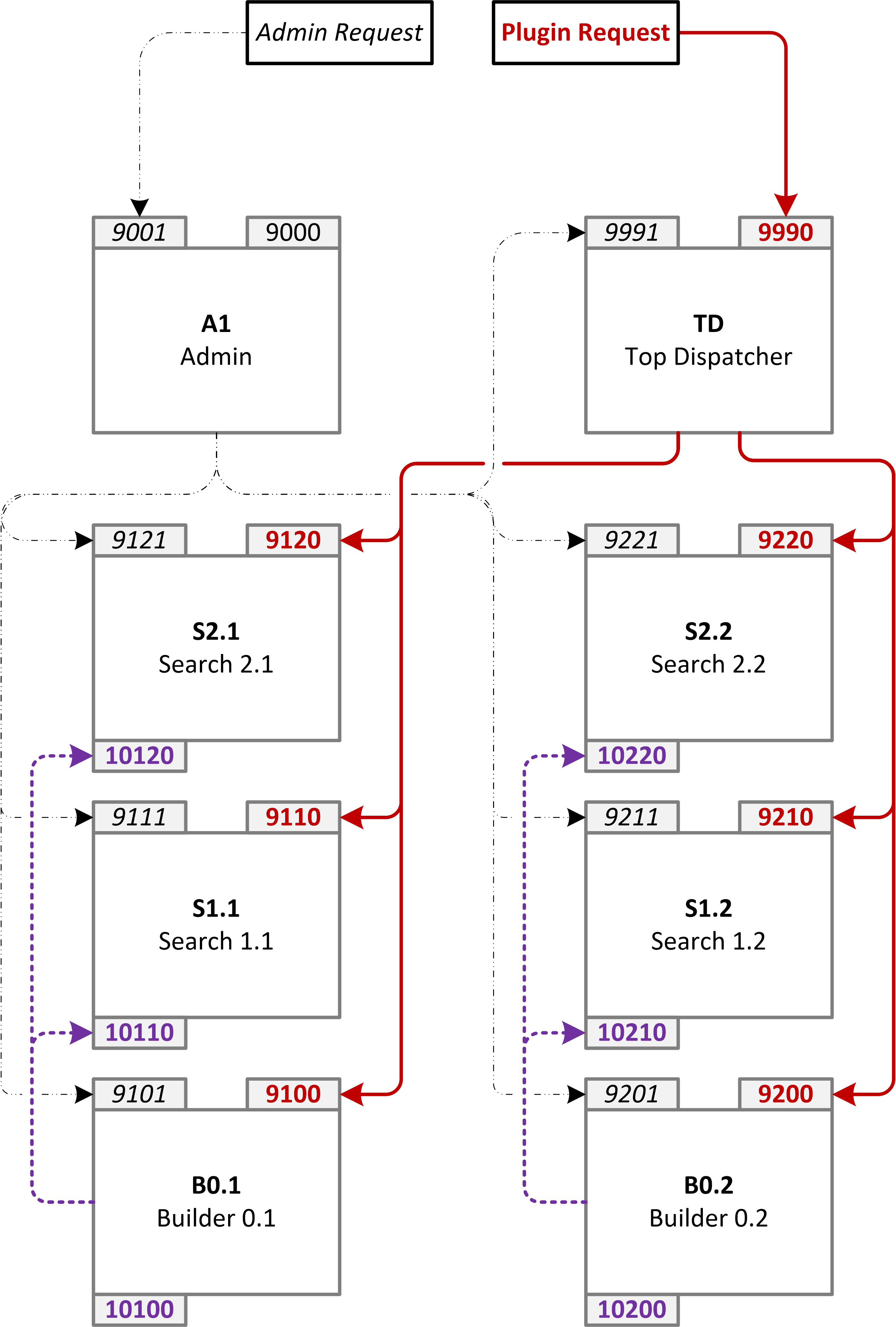
4.2. Service Example Descriptor
The system descriptor for our example topology is shown below. Place this JSON data in a file named vgx.cf in your demo directory.
demo/
├─ vgx.cf
{
    "name": "Example Service",

    "instances": {
        "A1": {
            "type": "admin", "description": "Admin",
            "group": 1000.001,
            "hport": 9000
        },
        "TD": {
            "type": "dispatch", "description": "Top Dispatcher",
            "group": 2000.001,
            "hport": 9990
        },
        "B0.1": {
            "type": "builder", "description": "Builder 0.1",
            "hport": 9100, "tport": 10100
        },
        "S1.1": {
            "type": "search", "description": "Search 1.1",
            "hport": 9110, "tport": 10110
        },
        "S2.1": {
            "type": "search", "description": "Search 2.1",
            "hport": 9120, "tport": 10120
        },
        "B0.2": {
            "type": "builder", "description": "Builder 0.2",
            "hport": 9200, "tport": 10200
        },
        "S1.2": {
            "type": "search", "description": "Search 1.2",
            "hport": 9210, "tport": 10210
        },
        "S2.2": {
            "type": "search", "description": "Search 2.2",
            "hport": 9220, "tport": 10220
        }
    },

    "common": {
        "host": "127.0.0.1"
    },

    "topology": {
        "transaction": {
            "A1": {},
            "B0.1": [
                "S1.1",
                "S2.1"
            ],
            "B0.2": [
                "S1.2",
                "S2.2"
            ]
        },
        "dispatch": {
            "TD": [
                { "channels": 32, "priority": 1,
                  "partitions": [ "S1.1", "S1.2" ]
                },
                { "channels": 32, "priority": 1,
                  "partitions": [ "S2.1", "S2.2" ]
                },
                { "channels": 2, "priority": 20,
                  "partitions": [ "B0.1", "B0.2" ],
                  "primary": 1
                }
            ]
        }
    },

    "graphs": ["g1"]
}
4.3. Service Example Python Program
The Python service implementation code below should be placed in a file named exampleservice.py in your demo service package directory.
demo/
├─ service/
│  ├─ exampleservice.py
from pyvgx import *
import pyvgx
import sys
import time


def LocalSamplePlugin( request:PluginRequest ):
    """
    Hello world plugin
    """
    response = PluginResponse()
    msg = "Hello, the current time is: {}".format( time.ctime() )
    response.Append( msg )
    return response


def GetPluginDefinitions():
    """
    Service endpoint definitions
    """
    return [
      {
        "name"   : "search",         # /vgx/plugin/search
        "package": __package__,      # 'service'
        "module" : ".exampleplugin", # exampleplugin.py
        "engine" : "Search",         # name of plugin function
        "pre"    : None,             # no pre-processor
        "post"   : None,             # no post-processor
        "graph"  : "*"               # use 'g1' defined in vgx.cf
      },
      {
        "name"   : "add",            # /vgx/plugin/add
        "package": __package__,      # 'service'
        "module" : ".exampleplugin", # exampleplugin.py
        "engine" : "Add",            # name of plugin function
        "pre"    : "PreAdd",         # name of pre-processor
        "post"   : None,             # no post-processor
        "graph"  : "*"               # use 'g1' defined in vgx.cf
      },
      {
        "name"   : "hello",          # /vgx/plugin/hello
        "engine" : LocalSamplePlugin
      }
    ]


def AdminInit():
    """
    Finalize startup of all instances
    """
    t0 = time.time()
    expected_ids = set(
      pyvgx.Descriptor( "vgx.cf" ).instances.keys()
    )
    while time.time() - t0 < 30:
        try:
            S = pyvgx.VGXAdmin.Run(
                arguments=[ '--status', '*' ],
                address="127.0.0.1:9001",
                print_to_stdout=False,
                default_descriptor_filename="vgx.cf"
            )
            ids = set( [x.split()[0] for x in S[0]['trace']
                        if x.split()[1] == '0d']
            )
            assert ids == expected_ids
            R = pyvgx.VGXAdmin.Run(
                arguments=[ '--attach', 'B*',
                            '--servicein', 'S*'
                ],
                address="127.0.0.1:9001",
                print_to_stdout=False,
                default_descriptor_filename="vgx.cf"
            )
            for r in R[1:]:
                A = ['attached', 'service_in']
                assert r[1]['action'] in A
        except:
            time.sleep(1)


def RunService( instance_id ):
    """
    Run VGX Server instance
    """
    # Initialize core library to enable instance startup
    pyvgx.initadmin()

    # Service endpoint definitions
    plugins = GetPluginDefinitions()

    # VGX System descriptor
    descriptor = pyvgx.VGXInstance.GetDescriptor( "vgx.cf" )

    # Start VGX instance
    instance = pyvgx.VGXInstance.StartInstance(
        id         = instance_id,
        descriptor = descriptor,
        basedir    = "demoservice",
        plugins    = plugins
    )

    # Finalize startup
    if instance.type == "admin":
        AdminInit()

    # Run until SIGINT
    pyvgx.system.RunServer( name=instance.description )


if __name__ == "__main__":
    RunService( sys.argv[1] )
4.4. Service Example Plugin Code
The plugin implementation code below should be placed in a file named exampleplugin.py in your demo service package directory.
demo/
├─ service/
│  ├─ exampleplugin.py
from pyvgx import *
import random
import time


def Search( request:PluginRequest,
            graph:Graph,
            name:str,
            hits:int=10,
            sortby:str="val",
            sortdir:str="desc",
            fields:int=F_AARC|F_RANK ) -> PluginResponse:
    """
    Engine plugin example: Search
    """
    root = system.Root()
    if sortdir == "desc":
        d = S_DESC
    else:
        d = S_ASC

    if sortby == "val":
        pr = PluginResponse( maxhits=hits, sortby=S_VAL|d )
        sf = F_VAL
        fn = "arc"
        fn2 = "value"
    elif sortby == "id":
        pr = PluginResponse( maxhits=hits, sortby=S_ID|d )
        sf = F_ID
        fn = "id"
    elif sortby == "deg":
        pr = PluginResponse( maxhits=hits, sortby=S_DEG|d )
        sf = F_DEG
        fn = "degree"
    else:
        pr = PluginResponse( maxhits=hits, sortby=S_NONE )
        sf = 0
        fn = None

    try:
        result = graph.Neighborhood(
            id      = name,
            arc     = D_ANY,
            hits    = pr.maxhits,
            sortby  = pr.sortby,
            fields  = fields|sf,
            result  = R_DICT,
            timeout = 1000
        )
        pre_message = request.get('pre-message')
        for r in result:
            rv = r.get(fn)
            if type(rv) is dict:
                rv = rv.get(fn2)
            r['pre'] = pre_message
            r['this'] = root
            pr.Append( rv, r )
    except KeyError:
        return pr
    except Exception as err:
        pr.message = repr(err)
        print(err)
    return pr


def PreAdd( request:PluginRequest, graph:Graph ) -> PluginRequest:
    """
    Pre-processor plugin example: PreAdd
    """
    # Always route this request to the primary row
    request.primary = 1
    return request


def Add( request:PluginRequest,
         graph:Graph,
         N:int=10000,
         count:int=500,
         sleep:int=0 ) -> PluginResponse:
    """
    Engine plugin example: Add
    """
    # Add random data
    response = PluginResponse()
    if count >= 0:
        for i in range(count):
            a = random.randint(1, N)
            while True:
                b = random.randint(1, N)
                if a != b:
                    break
            r = random.random()
            A = None
            B = None
            try:
                graph.CreateVertex( str(a) )
                graph.CreateVertex( str(b) )
                A, B = graph.OpenVertices(
                  [str(a), str(b)],
                  timeout=100
                )
                graph.Connect( A, ("to", M_FLT, r), B )
            finally:
                if A is not None:
                    A.Close()
                if B is not None:
                    B.Close()
            if sleep > 0:
                time.sleep( sleep/1000 )
        response.Append( "Added {}".format(count) )
    else:
        count = -count
        c0 = graph.Order()
        for i in range(count):
            if graph.Order() == 0:
                break
            x = graph.GetVertexID()
            graph.Disconnect( x, timeout=2000 )
            graph.DeleteVertex( x, timeout=2000 )
            if sleep > 0:
                time.sleep( sleep/1000 )
        c1 = graph.Order()
        response.Append( "Deleted {}".format( c0-c1 ) )
    return response
4.5. Service Example Start Instances
In a terminal, navigate to your demo directory and run the commands below to start all system instances.
demo/
├─ run.cmd
├─ run.sh
for %%i in (A1 TD B0.1 B0.2 S1.1 S1.2 S2.1 S2.2) do (
    start "" /MIN python -m service.exampleservice %%i
)for i in A1 TD B0.1 B0.2 S1.1 S1.2 S2.1 S2.2; do
python -m service.exampleservice "$i" > /dev/null 2>&1 &
done4.6. Service Example Verify System Overview
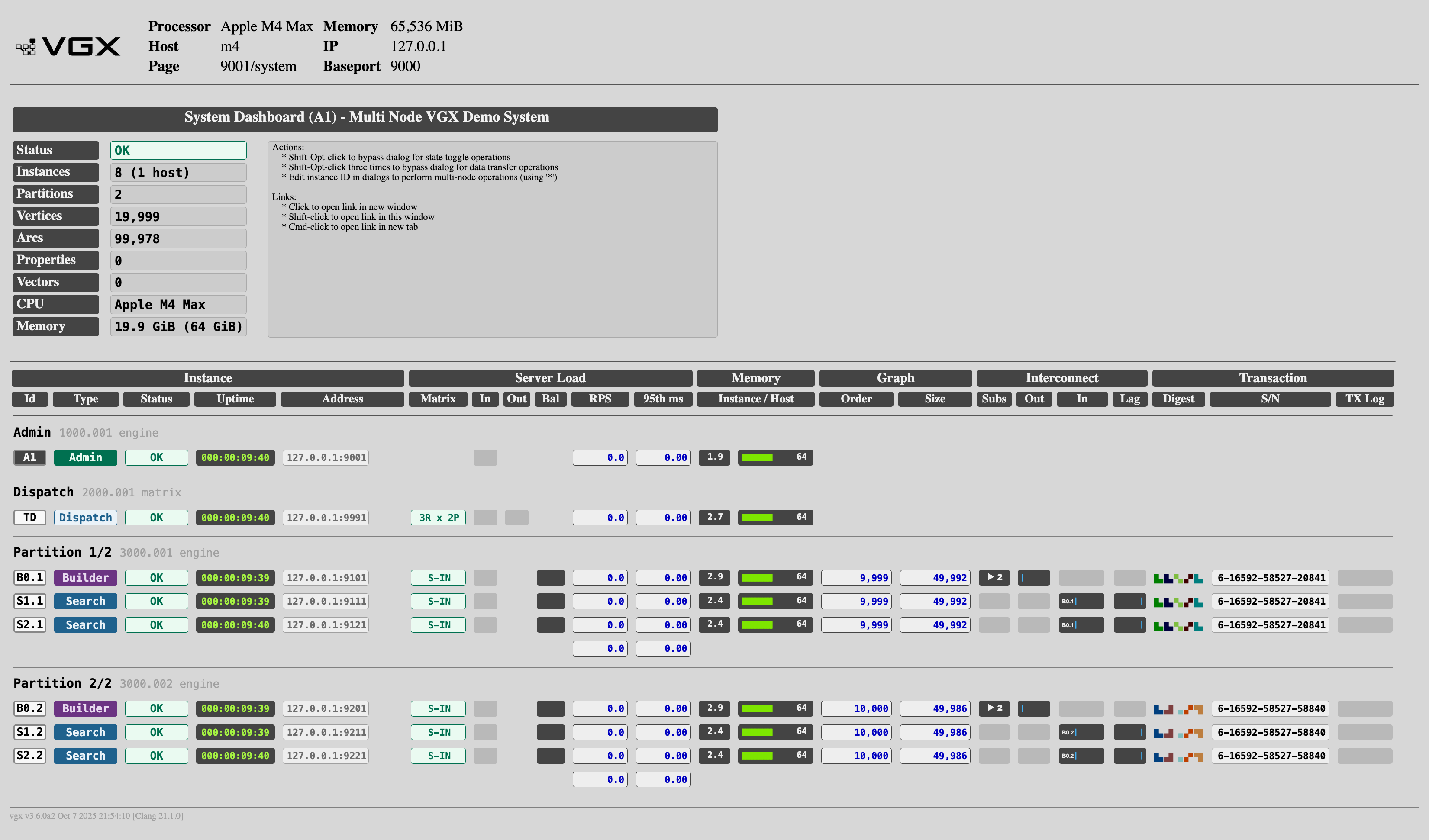
In a browser, navigate to http://127.0.0.1:9001/system to make sure all instances are running properly. Look for the green OK in the Status column.
You can also run the following command in a terminal to show status of each component:
vgxadmin --status @4.7. Service Example Load Data
The plugin endpoint /vgx/plugin/add can be used to populate the system with randomly generated data. Run the command below to generate a random graph. (If you don’t have curl installed, you can send the same request from a web browser.)
curl "http://127.0.0.1:9990/vgx/plugin/add?N=250000&count=3000000"4.8. Service Example Search Request
The plugin endpoint /vgx/plugin/search can be used to query the graph. Run the command below to test the search plugin.
curl "http://127.0.0.1:9990/vgx/plugin/search?name=12345"4.9. Service Example System Overview
Open http://127.0.0.1:9001/system in a browser. You should see the System Overview dashboard.