1. REAL/VIRTUAL Vertices
A vertex that is explicitly created is REAL.
When a new connection is created from a vertex to a terminal, the terminal is implicitly created as VIRTUAL if it does not exist. A REAL vertex becomes VIRTUAL if it is explicitly deleted while having inarcs from other vertices.
A VIRTUAL vertex is automatically removed from the graph when its last inarc is removed.
2. VGX Objects and pyvgx Wrapper Objects
When using the pyvgx Python module to access the VGX graph core it is important to understand the distinction between Python objects and objects in the VGX graph core. A pyvgx object in the Python environment is only a representation of the corresponding object inside VGX. The Python object is a wrapper serving as a bridge between Python and the actual graph structure.
2.1. Vertex Object Example
To illustrate this further, we will use pyvgx.Vertex as an example.
Let’s assume a vertex Bob exists in the VGX graph. Calling B = pyvgx.Graph.OpenVertex( "Bob" ) will then look up the vertex Bob inside VGX and try to acquire a lock. If this succeeds a new pyvgx.Vertex instance is created, returned and assigned to B. Internally the Python object B contains a reference to the VGX object Bob and is an independent owner of vertex Bob. If we open the vertex again as X = pyvgx.Graph.OpenVertex( "Bob" ) we will get another pyvgx.Vertex instance referencing Bob assigned to X. Then if we create a relationship pyvgx.Graph.Connect( X, "knows", "Alice" ) this will result in a new connection knows being established in the VGX graph from Bob to Alice. Although B and X are distinct Python objects they reference the same internal vertex Bob. Even though object X was used to perform the operation, B now has the exact same view into Bob as X has. For example: pyvgx.Graph.Adjacent( B, "knows", "Alice" ) will return True.
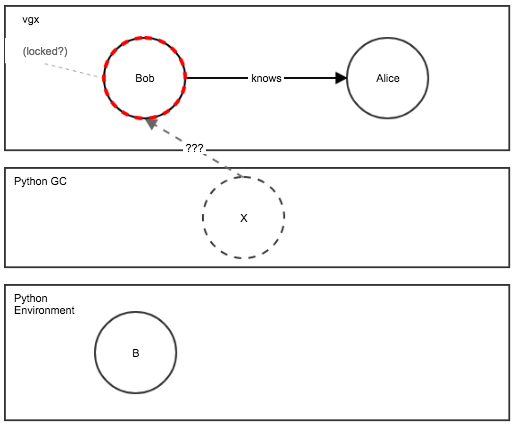
Each call to pyvgx.Graph.OpenVertex() will return a new pyvgx.Vertex instance with independent ownership of the internal vertex. A call to pyvgx.Graph.CloseVertex() will release ownership of the internal vertex for the pyvgx.Vertex being closed. The closed Python object can no longer be used to access the internal vertex. Trying to use the closed pyvgx.Vertex instance will raise pyvgx.AccessError. As such the closed Python vertex is now a defunct wrapper that can no longer be used to bridge the gap from Python into VGX (much like a closed file or socket.) Another way to give up ownership of the VGX vertex is to delete the pyvgx.Vertex using Python’s del operator or simply let it go out of scope.
| Although the VGX vertex is automatically released when its Python wrapper is deleted it is generally better to call pyvgx.Graph.CloseVertex() explicitly, both for code readability and to know exactly when the release occurs. Managing vertex ownership through Python’s object lifecycle means you are at the mercy of the garbage collector, which does not necessarily call the object deallocator immediately. You may end up in a situation where you think the vertex is closed because its former owner (the pyvgx.Vertex object) is deleted or gone out of scope, but the VGX vertex reference is still active behind the scenes. |
The following code and diagrams illustrate how this works.
2.2. Create a graph with vertices
We now create a new graph and add two vertices Alice and Bob.
from pyvgx import *
g = Graph( "test_objects" )
g.CreateVertex( "Bob" )
g.CreateVertex( "Alice" )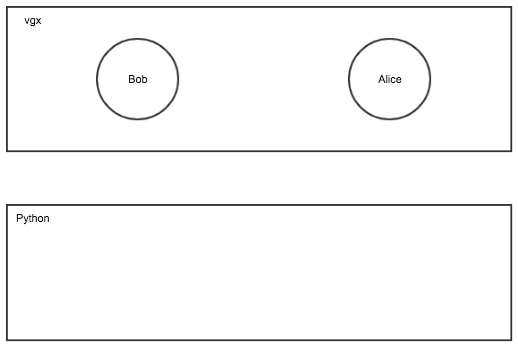
2.3. Open a vertex twice and create/check connection
Here we open the same vertex Bob twice, in a writable state, owned by two separate pyvgx.Vertex objects B and X. We then connect Bob (via the X reference) to Alice.
B = g.OpenVertex( "Bob" )             # Python object B owns "Bob"
X = g.OpenVertex( "Bob" )             # Python object X owns "Bob"
g.Connect( X, "knows", "Alice" )      # (Bob)-[knows]->(Alice)
g.Adjacent( B, "knows", "Alice" )     # True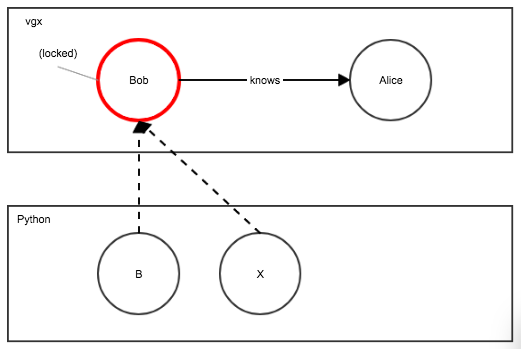
2.4. Close vertex using explicit call
Closing object B releases vertex ownership. The Python object still remains, but in a defunct state. Trying to access B will now raise pyvgx.AccessError.
g.CloseVertex( B )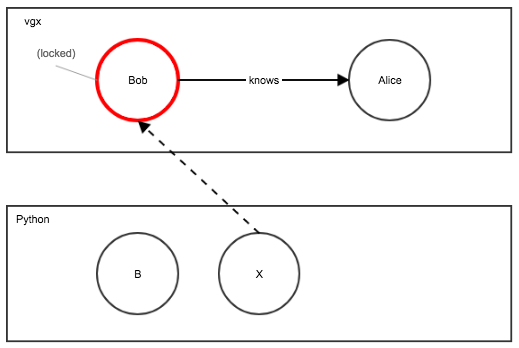
2.5. Close vertex automatically
Deleting object X is a Python interpreter operation that removes X from scope. However, the object will still exist until the garbage collector deallocates it. Only then will object X fully release its ownership of Bob.
| To ensure deterministic behavior in multi-threaded applications, use pyvgx.Graph.CloseVertex() instead of relying on Python’s garbage collector. |
del X             # X goes out of scope, but Bob may not be closed just yet (gc may not run yet)
#... we don't know if vertex is closed yet