System administration can be performed in three ways:
Section 1, “Admin Pages”
Section 2, “Administrative Service Endpoints”
Section 3, “vgxadmin Command Line Tool”
1. Admin Pages
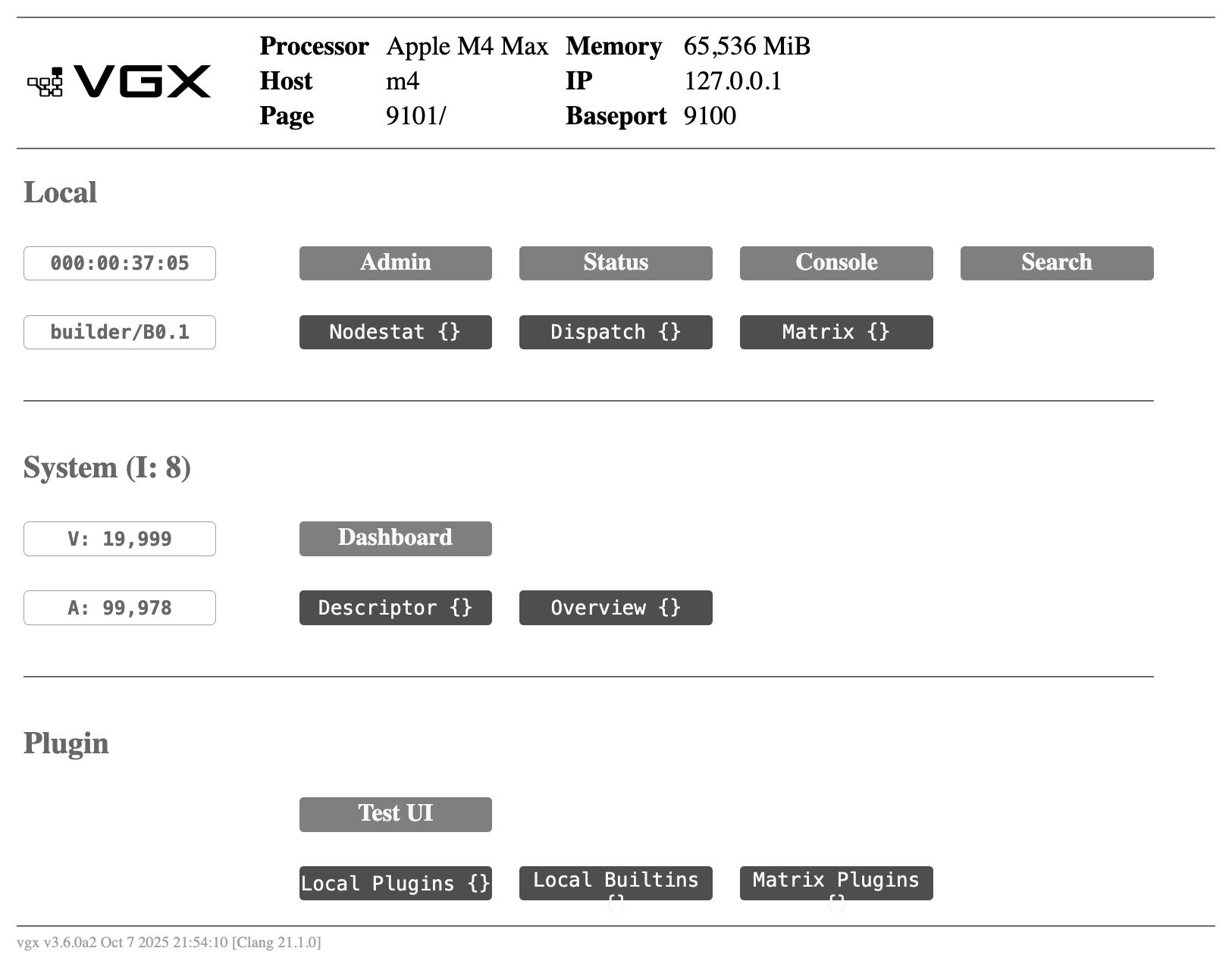
1.1. Top Menu /
Click on a grey box to open its page.
1.2. Admin /admin
Use this page for basic administration of a singe VGX Server instance.
|
Click the lock icon in the middle of the page to enable/disable the various action buttons. |
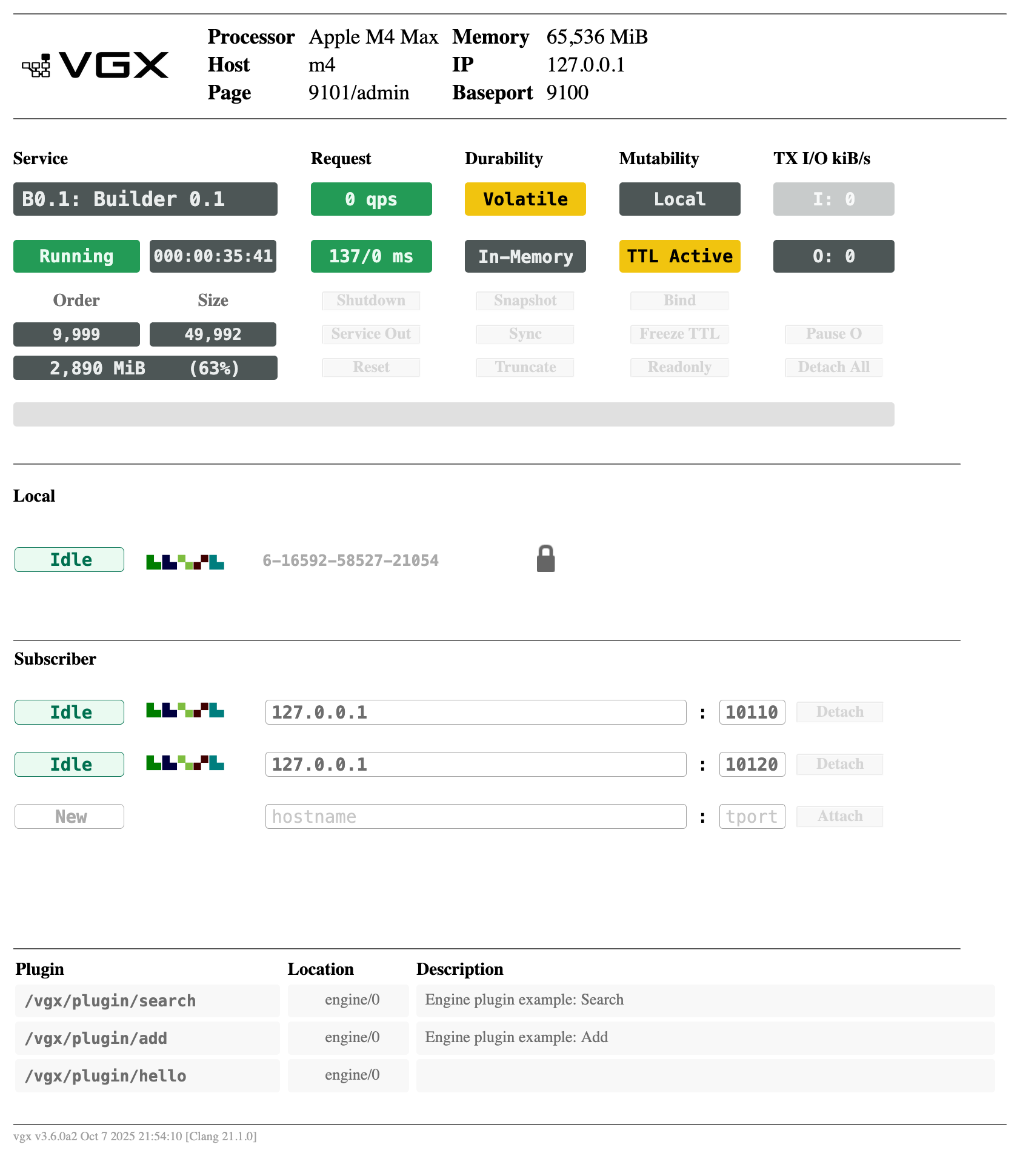
1.2.1. Display Readout
| Group | Box | Description |
|---|---|---|
Service |
Name |
Name of service, as provided to system.RunServer() name argument, or |
State |
|
|
Uptime |
|
|
Order / Size |
Order |
Total number of vertices in all loaded graphs |
Size |
Total number of arcs in all loaded graphs |
|
Memory Usage |
Memory used by this VGX Instance (% of physical memory on host) |
|
Request |
Request Rate |
Current requests per second reaching this VGX Server instance |
Latency |
Average / 99th Percentile request latency in milliseconds |
|
Durability |
Persistence |
|
State |
|
|
Mutability |
Execution Mode |
|
Mutable Mode |
|
|
TX I/O kiB/s |
Transaction Input Rate |
Current data received from subscriber |
Transaction Output Rate |
Current data sent to subscriber(s) |
|
Local |
State |
|
Digest |
Identicon representing current local state |
|
Serial Number |
Transaction sequence number |
|
Provider |
State |
|
Digest |
Identicon representing provider’s current state |
|
Hostname |
Provider’s hostname or IP address |
|
Hport |
Provider’s HTTP server admin port (visible only when initiating subscription) |
|
Subscriber |
State |
|
Digest |
Identicon representing subscriber’s current state |
|
Hostname |
Subscriber’s hostname or IP address |
|
Tport |
Subscriber’s input txport |
1.2.2. Action Buttons
|
Some actions are available only in certain modes. A button is not shown if its associated action is not applicable to this VGX Server instance. |
| Action | Opposite Action | Description |
|---|---|---|
|
Stop VGX Server instance |
|
|
|
Toggle S-OUT/S-IN mode for HTTP server plugin execution |
|
Reset all HTTP Server performance metrics to their initial state |
|
|
Persist all in-memory data to disk |
|
|
Initiate bulk synchronization of all data from this VGX Server instance to all attached subscribers |
|
|
Remove all data from memory |
|
|
|
Start or stop VGX Transaction Service |
|
|
Pause or resume automatic expiration events for all graphs |
|
|
Toggle readonly state for all graphs |
|
|
Pause or resume transaction input stream |
|
|
Pause or resume transaction output stream |
|
Detach all subscribers |
|
|
Request to become a subscriber of the specified provider |
|
|
Provider row: Detach from provider Subscriber row(s): Detach from subscriber |
|
|
Become a provider for the specified subscriber |
1.3. Status /status
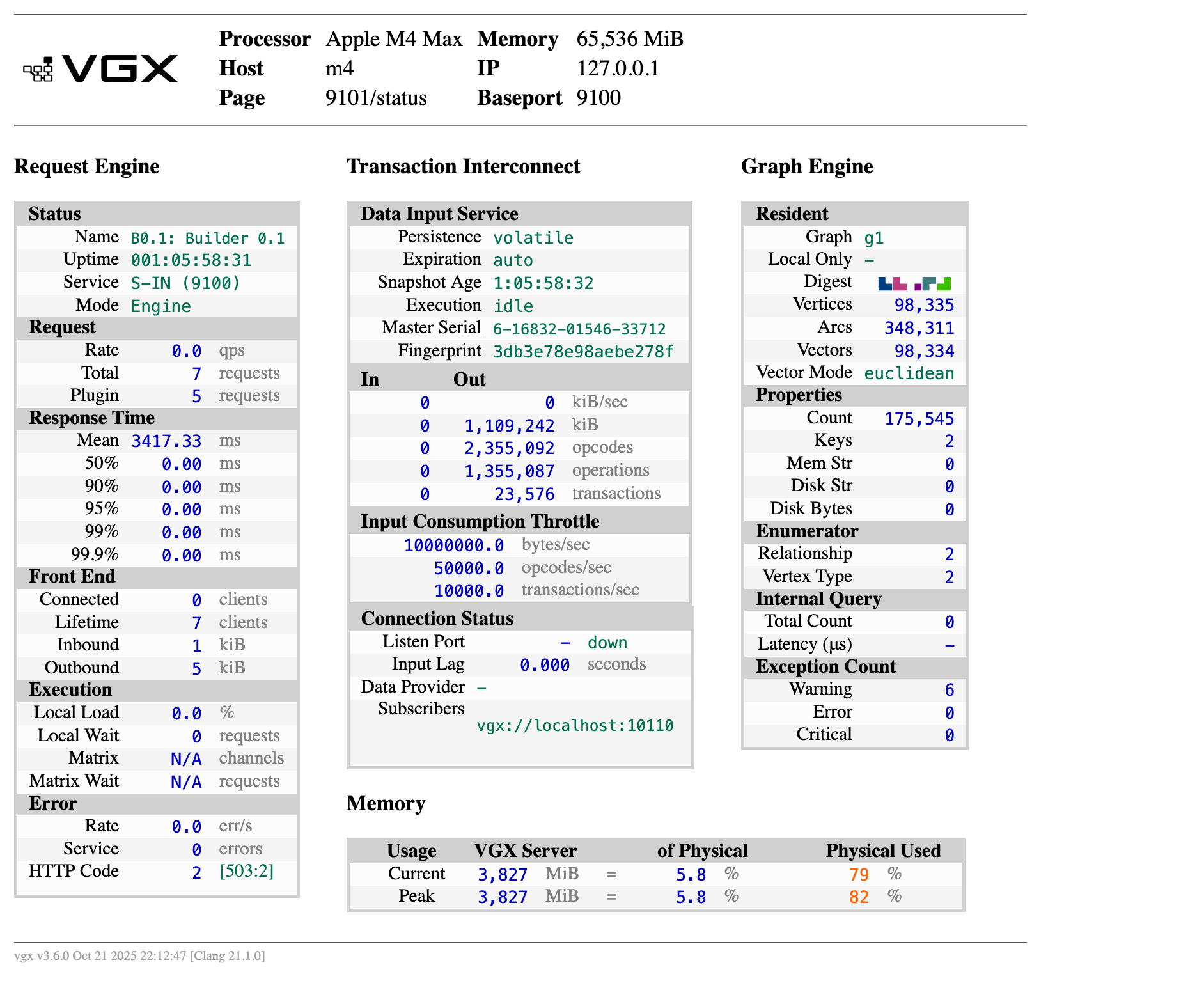
This is a readonly summary page showing various metrics and counters.
- Request Engine
-
HTTP server metrics
- Transaction Interconnect
-
VGX Transaction Service metrics
- Graph Engine
-
Graph objects and property storage summary
- Memory
-
System memory usage information
1.4. Console /console
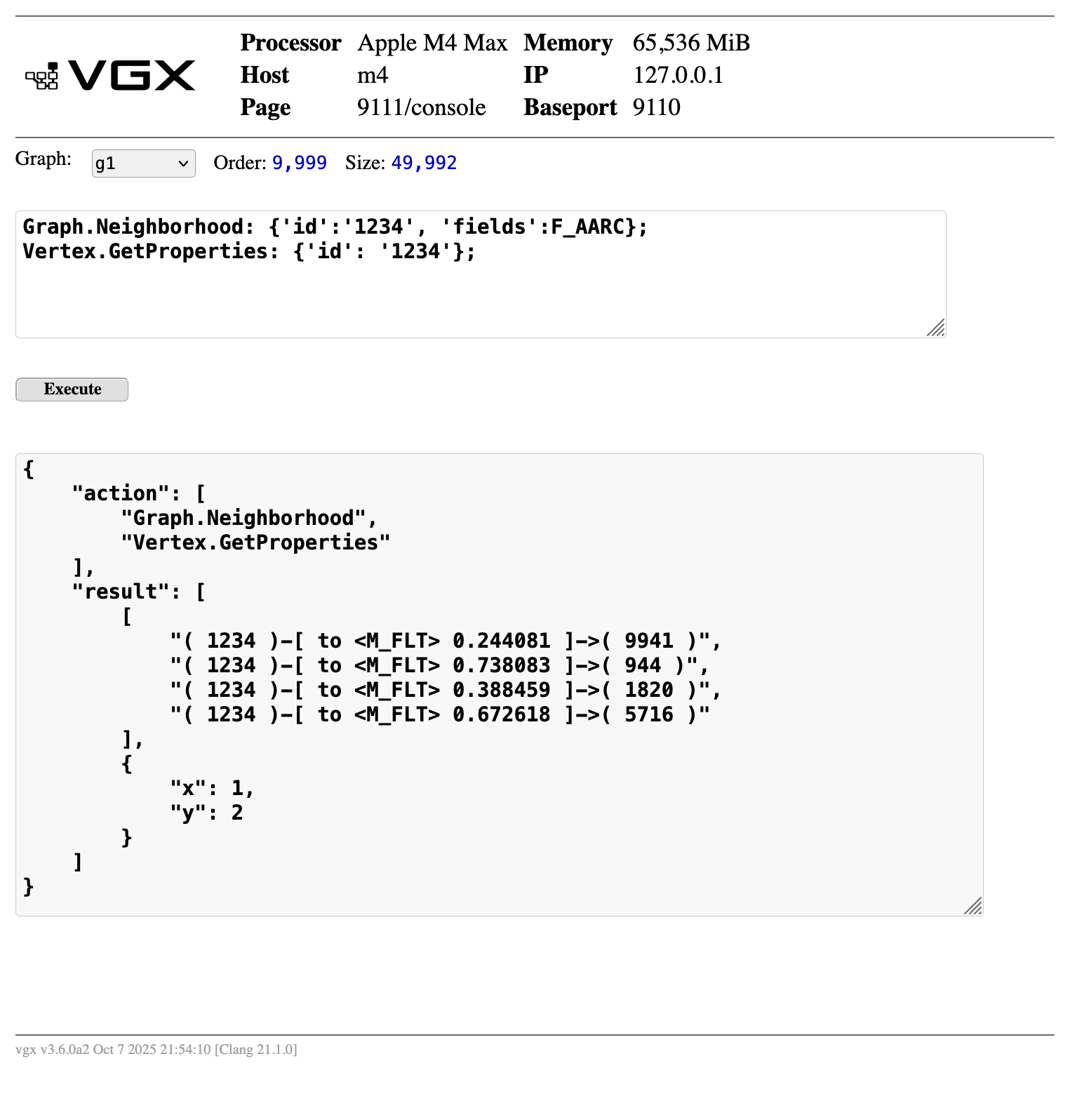
This page is a general purpose command interface for detailed manipulation and investigation of a running system, useful for troubleshooting and repair.
|
API command arguments are supplied as dict: |
1.5. General Search /search
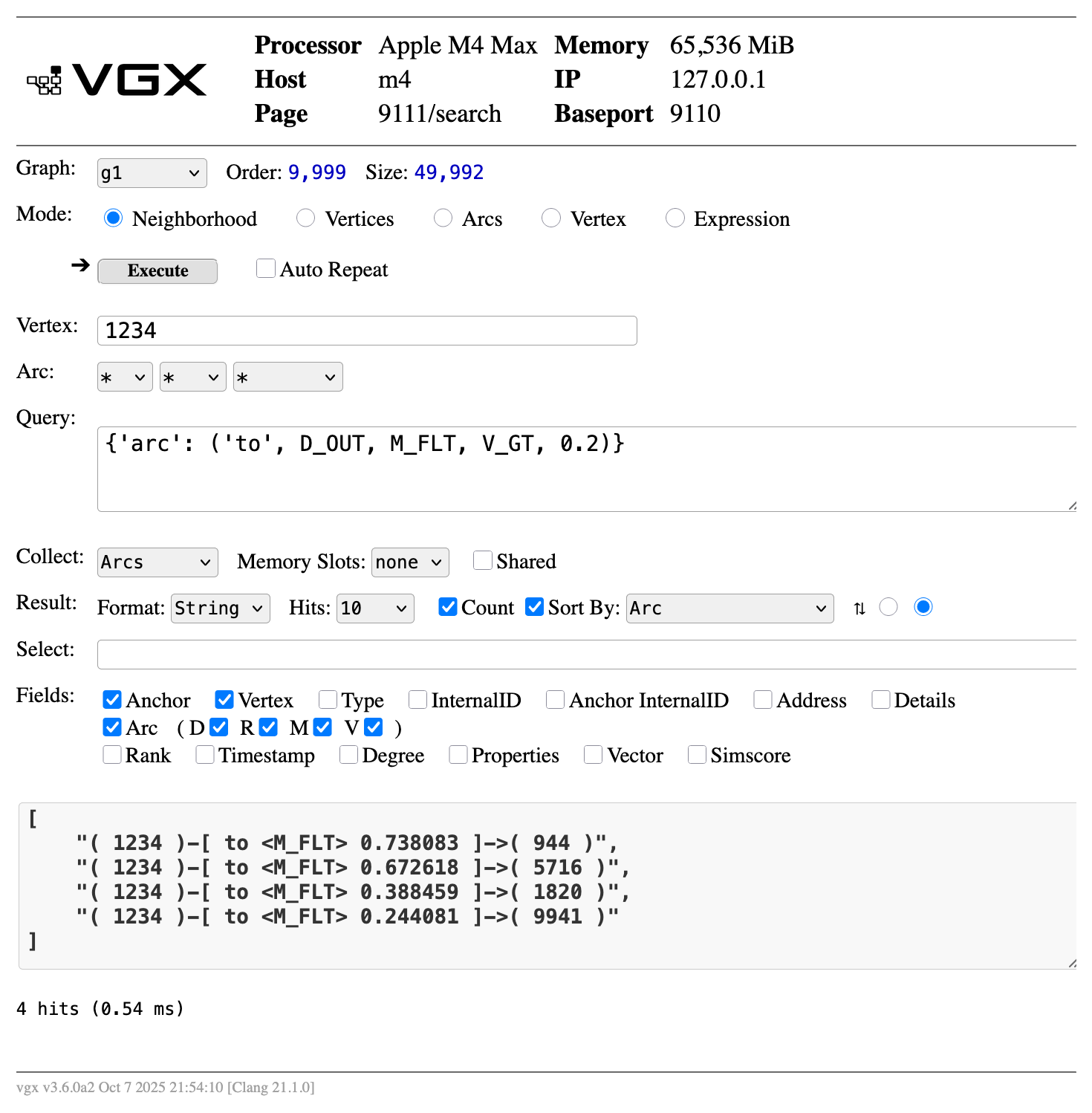
This page provides a general search interface.
- Neighborhood
-
Maps to pyvgx.Graph.Neighborhood()
- Vertices
-
Maps to pyvgx.Graph.Vertices()
- Arcs
-
Maps to pyvgx.Graph.Arcs()
- Vertex
-
Display all vertex attributes and properties
- Expression
-
Maps to Evaluate()
1.6. User Plugins and Builtin Plugins /plugin
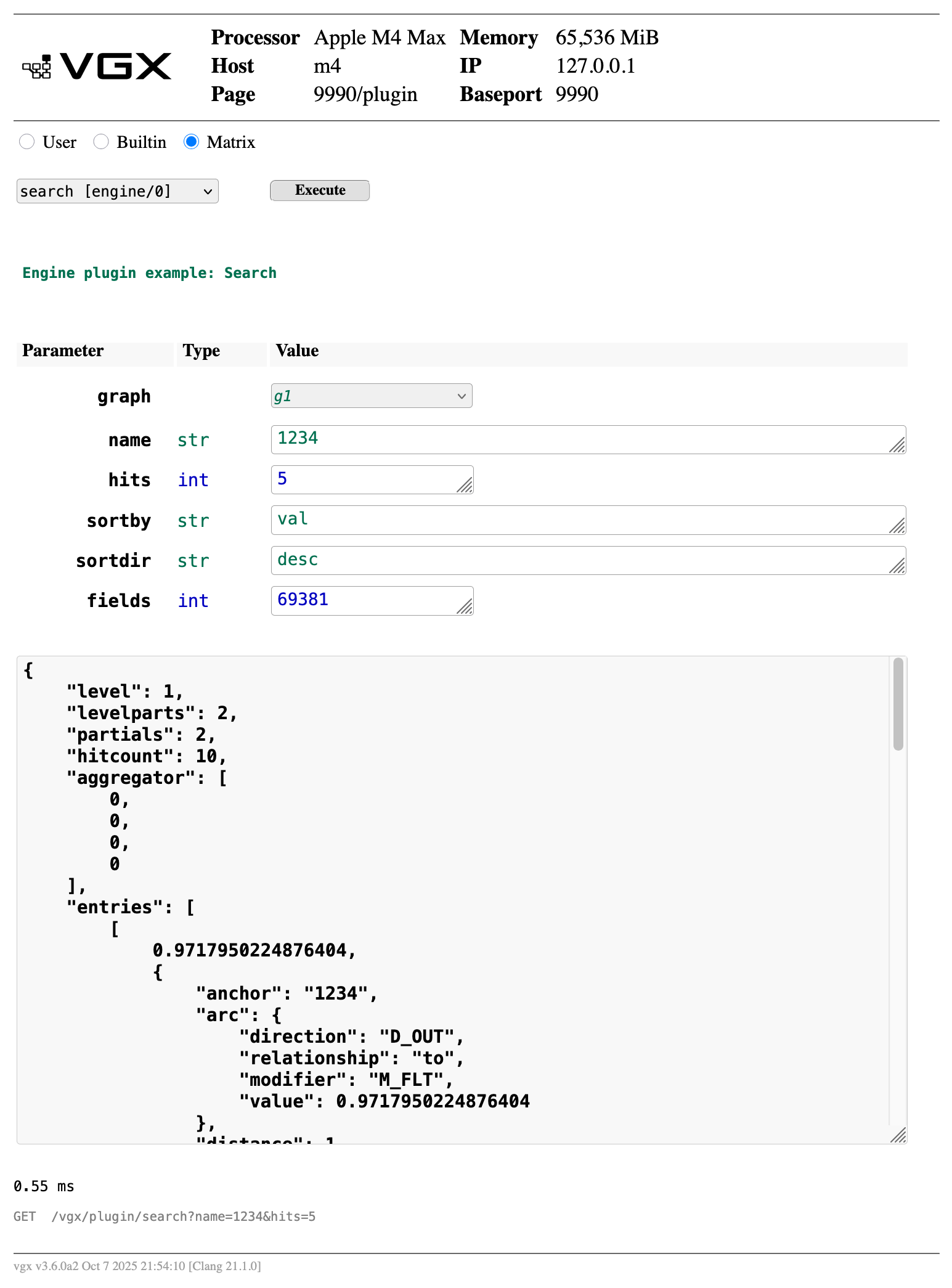
This page allows plugins to be tested.
|
Normally all admin UI pages should be accessed on the admin port. However, this page must be loaded on the main port when the plugin is a dispatcher pre-processor. If not, an error Page header is shaded in light red when accessed on the main port as a warning, because admin tasks can lock executor threads for an extended period of time, which could lead to problems in a live system. Click the bar counter |
1.7. Multi-Node System Dashboard /system
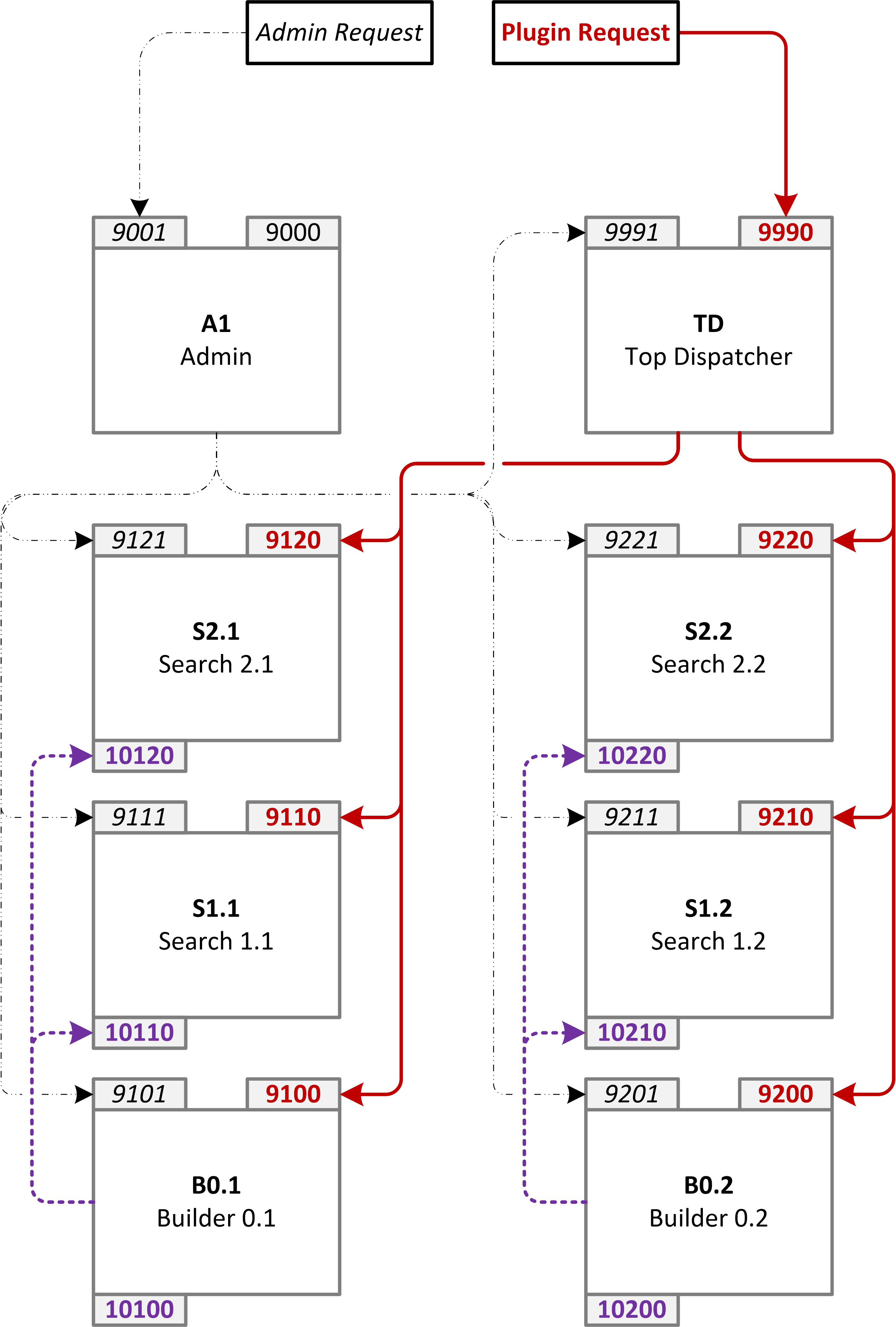
Multiple VGX Server instances can be deployed together as a system. This page shows a summary of all nodes in the system and their roles.
|
For this page to work the SYSTEM_Descriptor property has to be defined. This is a property of the system graph describing all nodes and their roles. |
Consider a system with eight VGX Server instances deployed as show below:
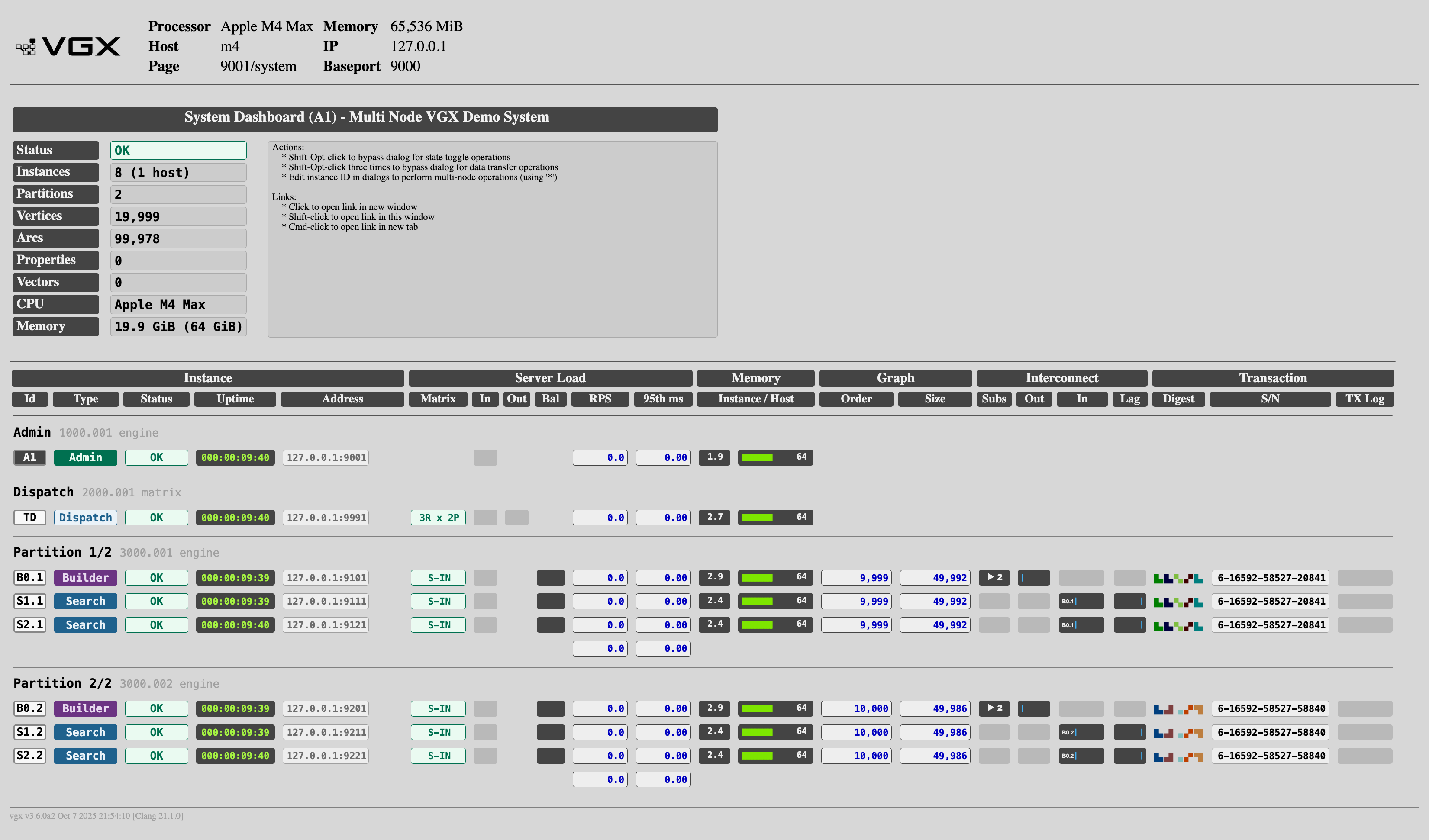
The System Overview dashboard for this example system will look like this:
1.7.1. System Dashboard Description
The dashboard’s upper segment shows a summary of information aggregated across all instances in the system. The System Name is the name defined in the system descriptor.
| Column | Value | Description |
|---|---|---|
Status |
|
All components are running normally |
|
One or more components requires attention |
|
Instances |
i (h hosts) |
Total number of instances i running on h separate hosts |
Domain |
name |
Network domain name |
Partitions |
p |
Number of partitions (Builder instances) |
Vertices |
order |
Total number of vertices across all partitions |
Arcs |
size |
Total number of arcs across all partitions |
Properties |
nprop |
Total number of properties across all partitions |
Vectors |
nvec |
Total number of vectors across all partitions |
CPU |
model |
CPU model brand string installed on server(s) |
Memory |
used (hostmem) |
Total used memory for all instances in system, out of the total hostmem memory available on all hosts |
The dashboard’s lower segment shows details for each system instance.
| Column | Value | Description |
|---|---|---|
[Instance] |
||
Instance Label |
Unique instance identifier |
|
|
Holds system configuration master and orchestrates multi-node admin operations |
|
|
Request dispatcher responsible for distributing requests to back-end matrix, merging results, and executing any pre or post processing plugins |
|
|
Responsible for generating graph data which is distributed to Search nodes, and plugin engine execution |
|
|
Responsible for plugin engine execution against graph data received from Builder node |
|
|
Intermediary whose main purpose is to receive transaction data from Builder and forward to Search nodes, while optionally providing streaming persistence (durability) |
|
|
Default, unspecified node type |
|
Status |
|
Instance is running normally |
|
Transaction input processing is lagging more than 30 seconds behind provider |
|
|
Service Out: HTTP Server plugin execution is paused |
|
|
Instance is synchronizing its data to attached subscriber(s) |
|
|
Instance is persisting data to disk |
|
|
Instance does not respond to status requests and is either not running or not reachable. Intermittent occurrences of this status may appear under heavy load. |
|
|
Instance is in readonly mode |
|
|
Instance is initializing after startup |
|
|
Instance is running but did not provide node status information |
|
Uptime |
|
Time since instance was started |
|
Hostname (or IP) and admin port of instance. Subtract 1 from admin port to get main service/plugin port. |
|
Notice |
<empty> |
No warnings |
|
Serial number difference between this instance and its provider |
|
|
Instance with VGX Transaction Service running (bound txport) has no provider attached |
|
|
Dispatcher’s back-end matrix is incomplete due to one or more partitions without any replicas |
|
|
Dispatcher’s back-end matrix has one or more partitions with inconsistent replicas, or back end subscriber instance is out of sync with its provider |
|
|
Dispatcher’s back-end matrix has one or more unavailable replicas (reduced query capacity) |
|
|
Memory warning: Physical host memory usage is 81% - 88% |
|
|
High memory warning: Physical host memory usage is 88% - 94% |
|
|
Critically high memory: Physical host memory usage is above 94% |
|
|
All engine partition(s) unavailable in dispatcher back-end matrix (or partial matrix not allowed) |
|
[Server Load] |
||
Matrix |
|
Service In: Back end engine instance operating normally |
|
Service Out: Back end or dispatcher instance not accepting plugin requests |
|
|
Proxy Dispatcher’s back-end replica count m |
|
|
Matrix Dispatcher’s back-end dimensions (m replicas, n partitions) |
|
<empty> |
N/A |
|
In |
Sockets |
Number of connected clients |
Out |
Sockets |
Number of channels connected to backend matrix |
Bal |
Load Balance |
Relative request rate in group |
RPS |
Request Rate |
HTTP Server requests per second |
95th ms |
Request Latency |
HTTP Server 95th percentile request latency in milliseconds |
[Memory] |
||
Instance/Host |
Instance/Total |
Memory used (in GiB) by instance / Physical host total memory usage |
[Graph] |
||
Order |
Vertices |
Total number of vertices in all graphs |
Size |
Arcs |
Total number of arcs in all graphs |
[Interconnect] |
||
Subs |
Subscribers |
Currently attached subscribers |
Out |
Data Out Rate |
Provider transaction data output rate |
In |
Data In Rate |
Subscriber transaction data input rate |
Lag |
Data In Lag |
Subscriber transaction input lag |
[Transaction] |
||
Digest |
State identicon |
Representing current state of instance data |
S/N |
Serial Number |
Most recent transaction serial number |
TX Log |
TX Log Size |
In durable mode, transaction log grows until max size triggers batch persist, which clears the log and starts filling it again |
1.7.2. System Dashboard Actions
Many of the UI elements can be clicked to perform an action. Some elements open another page. Some elements perform an administrative action. When clicking an element that performs an action a dialog appears. The instance identifier for the clicked instance is pre-populated in the dialog. It is possible to edit the instance identifier, e.g. to perform the action on multiple instances by using the * wildcard symbol. For example, if clicking S-IN in the Matrix column for instance S1.1 you can edit the instance to S* in the pup-up dialog. This will perform the action on all instances whose identifier starts with S.
1.7.2.1. Dialog Bypass
Hold down the Shift key to reveal action buttons describing the actions associated with elements.
To bypass the dialog hold down Shift-Alt (Windows) / Shift-Opt (MacOS) while clicking an action button.
To bypass the dialog for potentially destructive actions you have to click the action button three times while holding down Shift-Alt/Shift-Opt.
1.7.2.2. Links
Elements that open another page when clicked will open the link in a new window by default.
Hold down the Shift key to open the link in the current window.
Hold down Shift-Ctrl (Windows) / Shift-Cmd (MacOS) to open the link in a new tab.
1.7.2.3. Action Description
| Column Element | Action When Clicked |
|---|---|
Id |
Open instance |
Type |
Open instance |
Status |
Open instance |
Uptime |
Perform instance |
Address |
Open instance |
Matrix |
Toggle instance S-IN/S-OUT state. The performed action depends on the current service state of the clicked instance. |
RPS |
Restart the instance HTTP server. This does not restart the VGX Server instance, only the HTTP server. |
95th ms |
N/A |
Memory |
Persist instance to disk |
Order |
Perform reverse synchronization of data. This only applies to provider instances already attached to one or more subscribers. |
Size |
Perform forward synchronization of data. This only applies to provider instances already attached to one or more subscribers. |
Subs |
Toggle attach/detach of provider instance. Applies to provider instances only. |
Out |
Toggle pause/resume of provider instance transaction output. Applies to attached provider instances only. |
In |
Toggle pause/resume of subscriber instance transaction input. Applies to attached subscriber instances only. |
Lag |
Unsubscribe from provider. Applies to attached subscriber instances only. |
Digest |
Attempt to repair/synchronize instances that are configured as subscribers of the clicked provider instance. |
S/N |
Perform a rolling update / synchronization of the provider instance’s attached subscriber instances. At least two subscribers are required for this operation. |
TX Log |
N/A |
2. Administrative Service Endpoints
All administrative tasks can be performed using the service endpoints described in this section.
2.1. authtoken
All administrative plugins require parameter authtoken, which helps prevent accidental execution of administrative tasks. Before calling any of these plugins, first retrieve a new token via /vgx/builtin/ADMIN_GetAuthToken, then pass the returned token as authtoken parameter for the administrative plugin.
The authtoken retrieved by /vgx/builtin/ADMIN_GetAuthToken can only be used once and expires 100 seconds after its was retrieved.
2.1.1. authtoken Example
http://127.0.0.1:9000/vgx/builtin/ADMIN_GetAuthToken
{
    "status": "OK",
    "response": {
        "authtoken": "3c8b886d2ef4565378339d580b689ef7fff8bf0ce55da1bbc5f6c1a140f1cf71",
        "t0": 1715134438.5777998,
        "tx": 1715134738.5777998
    },
    "level": 0,
    "partitions": null,
    "exec_ms": 0.142
}
2.2. ADMIN Plugins
Call these endpoints to perform administrative tasks. Obtain a new, unique authtoken before making a request.
2.2.1. ADMIN Plugin Parameters
Use endpoint /vgx/builtin/argspec?plugin=name to see a description of parameters for each service.
http://127.0.0.1:9000/vgx/builtin/argspec?plugin=ADMIN_Throttle
{
    "status": "OK",
    "response": [
        {
            "path": "/vgx/builtin/ADMIN_Throttle",
            "description": [
                "",
                "ADMIN: Throttle TX input",
                "rate : Limit TX input processing to units per second",
                "unit : bytes, opcodes, operations, transactions",
                "    "
            ],
            "parameters": {
                "request": "<class 'pyvgx.PluginRequest'>",
                "headers": "dict",
                "authtoken": "str",
                "rate": [
                    "float",
                    -1
                ],
                "unit": [
                    "str",
                    "bytes"
                ]
            },
            "bound_graph": "None"
        }
    ],
    "level": 0,
    "partitions": null,
    "exec_ms": 0.182
}
2.2.2. General
| URI Path | Description |
|---|---|
|
Generate a new, unique authtoken to be submitted with the next admin request |
|
View or edit graph information, as in Section 1.4, “Console |
|
Initiate instance shutdown. This requires two authtokens. Obtain the first token and pass in |
|
Update the system descriptor |
2.2.3. Plugin Management
| URI Path | Description |
|---|---|
Reload all plugins initially loaded with pyvgx.VGXInstance.StartInstance(), whose definitions are located in dynamically re-loadable modules (i.e. reference functions in package/module.) New plugins can be dynamically added by POSTing plugin definition JSON. The plugin module file containing functions referenced in the definition must already exist on the server’s filesystem. |
2.2.4. Data Management
| URI Path | Description |
|---|---|
|
Stop synchronization of subscribers (pyvgx.system.CacnelSync()) |
|
Create snapshot on disk for all loaded graphs (pyvgx.system.Persist()) |
|
Synchronize all subscribers (pyvgx.system.Sync()) |
|
Delete all graph data (pyvgx.Graph.Truncate()) |
2.2.5. Graph State
| URI Path | Description |
|---|---|
|
Make all graphs writable (pyvgx.system.ClearReadonly()) |
|
Resume TTL process for all graphs (pyvgx.system.ResumeEvents()) |
|
Make all graphs readonly (pyvgx.system.SetReadonly()) |
|
Suspend TTL process for all graphs (pyvgx.system.SuspendEvents()) |
2.2.6. Request Engine
| URI Path | Description |
|---|---|
|
Reset VGX Server metrics (pyvgx.system.ResetMetrics()) |
|
Enable VGX Server plugin execution (pyvgx.system.ServiceInHTTP(True)) |
|
Disable VGX Server plugin execution (pyvgx.system.ServiceInHTTP(False)) |
2.2.7. Transaction Flow Management
| URI Path | Description |
|---|---|
|
Become a provider for the attached subscriber (pyvgx.op.Attach()) |
|
Start VGX Transaction service on this VGX instance (pyvgx.op.Bind()) |
|
Detach subscriber (pyvgx.op.Detach()) |
|
Detach all subscribers (pyvgx.op.Detach()) |
|
Resume processing of input transactions (pyvgx.op.ResumeTxInput()) |
|
Resume output of transaction data (pyvgx.op.ResumeTxOutput()) |
|
Request to become a subscriber of the specified provider instance (pyvgx.op.Subscribe()) |
|
Pause processing of input transactions (pyvgx.op.SuspendTxInput()) |
|
Pause output of transaction data (pyvgx.op.SuspendTxOutput()) |
|
Limit consumption rate of inbound transaction data (pyvgx.op.Throttle()) |
|
Stop VGX Transaction service on this VGX instance (pyvgx.op.Unbind()) |
|
Unsubscribe from provider (pyvgx.op.Unsubscribe()) |
|
Effectuate a provider’s subscriber state according to a specified goal. |
3. vgxadmin Command Line Tool
Command line tool vgxadmin offers a convenient way to manage and monitor a multi-node system.
A system descriptor is required for this tool to work. By default a file named vgx.cf in the current working directory is expected. An alternative file can be specified with option --cf. An optional <address> (host:port) can be specified to point the tool directly at a running VGX Server instance, using that instance’s system descriptor instead of a local file.
$ vgxadmin --help

usage: vgxadmin [<address|id>] <options>

    -a, --attach <id>[,<sub>[,...]] Attach instance to subscribers
    -B, --bind <id>                 Bind transaction input port
    -k, --cancelsync <id>           Terminate sync in progress
    -f, --cf <file>                 Use this local system descriptor file
    -C, --command <id>,<gr>,<cmd>   Send console command <cmd> to graph <gr>
    -c, --confirm                   Confirm operation (skip y/n prompt)
    -Z, --descriptor <id>           Update instance system descriptor
    -d, --detach <id>               Detach instance from subscribers
    -E, --endpoint <path>           Send request to <address>
    -K, --forcecopy <src>,<dst>     Force hard sync from <src> to <dst>
    -h, --help                      Show this help message
    -Q, --instancecfg <id>          Show instance configuration
    -n, --nodestat <id>[,<key>]     Nodestat
    -M, --opdump <id>               Dump instance data to output file
    -p, --pausein <id>              Pause transaction input
    -P, --pauseout <id>             Pause transaction output
    -t, --pausettl <id>             Pause TTL event processor
    -W, --persist <id>              Write instance data to disk
    -g, --readonly <id>             Make graph(s) readonly
    -N, --reloadplugins <id>[,<pd>] Reload or add plugins in <pd> json file
    -A, --reset <id>                Reset and restart service (if application supports it)
    -m, --resetmetrics <id>         Clear performance and error counters
    -e, --restart <id>              Restart service (if application supports it)
    -D, --restarthttp <id>          Restart HTTP server with refreshed config
    -r, --resumein <id>             Resume transaction input
    -R, --resumeout <id>            Resume transaction output
    -T, --resumettl <id>            Resume TTL event processor (if enabled)
    -Y, --reversesync <id>          Reverse sync instance data from attached subscriber
    -L, --rollingupdate <id>        Forward sync subscribers one at a time in S-OUT
    -I, --servicein <id>            Service in
    -i, --serviceout <id>           Service out
    -J, --show                      Show effective system descriptor
    -s, --start <id>                Start instance on the local host
    -S, --status <id>               System summary
    -x, --stop <id>                 Stop instance
    -y, --sync <id>[,<mode>]        Sync data to subscribers (<mode> [repair|hard|soft])
    -V, --throttle <id>[,<r>,<u>]   Throttle TX input rate <r>, unit <u>
    -X, --truncate <id>             Erase instance data
    -U, --unbind <id>               Unbind transaction input port
    -u, --unsubscribe <id>          Detach instance from provider
    -v, --version                   VGX Server version
    -w, --waitforidle <id>          Wait until instance input is idle
    -G, --writable <id>             Make graph(s) writable
3.1. vgxadmin Options
Many options require an argument <id>, which is a reference to instance identifiers in the system descriptor. <id> can be a single instance identifier, multiple identifiers separated by commas, or a wildcard pattern using *. (Some options do not accept multiple identifiers.)
Use the special identifier @ to mean all instances. (Often more convenient than * in case you forget to add quotes, causing trouble with shell expansion.)
|
The same option can occur multiple times. Actions are performed sequentially and synchronously, i.e. one action has to complete before the next action starts.
If <address> is specified, it can either be a valid instance identifier or the <host>:<port> of a running VGX Server instance. In this case the <id> argument for all specified options defaults to that instance’s identifier and can be omitted.
When only <address> is provided (no other options specified) a summary of the running VGX Server instance is printed.
3.1.1. --attach <id> (-a)
Attach provider instance(s) to subscribers in accordance with the transaction topology definition.
vgxadmin --attach B0.1 --attach B0.2vgxadmin --attach "B0.1, S1.1"|
Be careful when using |
3.1.2. --bind <id> (-B)
Start the transaction input service on the tport defined for this instance. If no tport is defined this command has no effect.
vgxadmin --bind S1.13.1.3. --cancelsync <id> (-k)
Terminate any data synchronization currently in progress.
vgxadmin --cancelsync "B*"3.1.4. --cf <file> (-f)
Use this local system descriptor file instead of the default vgx.cf.
another.cfvgxadmin --cf another.cf --status @3.1.5. --command <id>,<gr>,<cmd> (-C)
Send console command <cmd> for graph <gr>. The <cmd> syntax is the same used on the /console page.
vgxadmin --command S1.1,g1,"Graph.Vertices: {'hits':5, 'sortby':S_IDEG}"3.1.6. --confirm (-c)
Bypass y/n prompts for options that require confirmation.
vgxadmin --confirm --truncate S1.13.1.7. --descriptor <id> (-Z)
Update system descriptor on instance(s) with the effective system descriptor.
vgx.cf to all defined instancesvgxadmin --descriptor @3.1.8. --detach <id> (-d)
Detach provider instance(s) for all attached subscribers.
vgxadmin --detach "B*"3.1.9. --endpoint <path> (-E)
Send HTTP request <path> to instance specified in <address>, which is required for this option.
vgxadmin 127.0.0.1:9990 --endpoint "/vgx/builtin/metrics"vgxadmin 127.0.0.1:9100 --endpoint "/vgx/plugin/search?name=1234&hits=3"3.1.10. --forcecopy <src>,<dst> (-K)
Force hard sync from <src> instance to <dst> instance. This allows data to be copied between any nodes within a system, bypassing the configured transaction topology.
|
By creating a temporary system descriptor referencing instances in both system A and B it is possible to copy data between any nodes in both systems. |
vgxadmin --forcecopy "B0.2, B0.1"3.1.11. --help (-h)
Print vgxadmin usage options and exit.
vgxadmin --help3.1.12. --instancecfg <id> (-Q)
Show effective instance configuration parameters as defined in system descriptor.
vgxadmin --instancecfg TD3.1.13. --nodestat <id>[,<key>] (-n)
Retrieve /vgx/nodestat from instance(s) and print result, optionally filtered to only show attribute <key>.
vgxadmin --nodestat B0.1vgxadmin --nodestat "B*",memory-process3.1.14. --opdump <id> (-M)
Dump all graph data to an output file on the instance’s local file system. The file will be named opdump_<timestamp>.tx located directly under the instance vgxroot directory. Output data is written as VGX transactions and can be used to populate other instances.
To allow an instance to restore data from a local file, the service implementation can use pyvgx.op.Consume(). Data can be read line by line from opdump<timestamp>.tx and submitted to pyvgx.op.Consume().
|
The instance being dumped must not be attached to any subscribers and must not have the transaction input service running. Use |
vgxadmin --opdump B0.1

# Output written to builder_B0.1/opdump_1731703450.tx
3.1.15. --pausein <id> (-p)
Pause transaction input service on subscriber instance(s). Transaction data will still be received and queued by subscribers, but not processed while in the paused state. Use --resumein to re-enable processing of received transaction data.
vgxadmin --pausein "S2*"3.1.16. --pauseout <id> (-P)
Pause transaction output emitter on provider instance(s). Transaction data is produced and queued, but not sent to subscribers while in the paused state. Use --resumeout to start sending data to subscribers again.
vgxadmin --pauseout "B*"3.1.17. --pausettl <id> (-t)
Pause TTL event processor. Objects with expiration time set will not be deleted while in the paused state. Use --resumettl to start processing TTL events again.
vgxadmin --pausettl "B*"3.1.18. --persist <id> (-W)
Save all instance data (all graphs) to disk.
vgxadmin --persist "B*"3.1.19. --readonly <id> (-g)
Transition all graph(s) to readonly mode. If the instance is currently a subscriber its transaction input processor will be paused.
vgxadmin --readonly "S*"3.1.20. --reloadplugins <id>[,<pd>] (-N)
Reload updated code for already registered plugins, or add plugins in <pd> json file.
The plugin implementation Python code must already exist on the filesystem of the instance being updated, and the plugin definition list must correctly specify the plugin package(s) and function(s).
If adding new plugins the <pd> file format is the JSON equivalent of the Python plugin definition list used with pyvgx.VGXInstance.StartInstance().
3.1.20.1. Example: Add square root capabilities to running system
Assuming the running service implementation exists in a package called service, add a new file extras.py to the package containing the following Python code:
|
The plugin implementation Python code must be placed on disk on every host for which we intend to execute the update. |
from pyvgx import *

def SquareRoot( request:PluginRequest, graph:Graph, x:float ):
    return x ** 0.5
On the local machine (where vgxadmin is to be executed) place a new file sqrt.json in the current directory with the following content:
[
  {
    "name":    "sqrt",
    "package": "service",
    "module":  ".extras",
    "pre":     "SquareRoot",
    "engine":  null,
    "post":    null,
    "graph":   "*"
  }
]|
VGX Server instances running in dispatcher mode load plugins defined as |
Execute the reload command:
vgxadmin --reloadplugins TD,sqrt.jsonNow, assuming TD runs locally on port 9990, we can make requests to compute square roots:
curl http://127.0.0.1:9990/vgx/plugin/sqrt?x=123{
"status": "OK",
"response": 11.090536506409418,
"level": 0,
"partitions": null,
"exec_ms": 0.072
}3.1.21. --reset <id> (-A)
Reset and restart service, if application supports this action. Resetting a service means erasing all graph data and persisting the empty system, before attempting restart.
For restart to work the application must be implemented as explained for vgxadmin --restart.
vgxadmin --reset "B1"3.1.22. --resetmetrics <id> (-m)
Clear errors and performance counters for instance(s).
vgxadmin --resetmetrics "S*"3.1.23. --restart <id> (-e)
Restart service, if application supports this action.
Supporting restart requires the application to re-enter pyvgx.system.RunServer() in a loop after exit caused by the restart request. Before calling RunServer() again the application must also start the HTTP server, since it automatically shuts down by this request.
If not implemented this way the restart request will terminate the service.
vgxadmin --restart "B1"3.1.23.1. Example: Minimal restartable application
def run():
    while True:
        system.StartHTTP( 9000 )
        system.RunServer()

run()
3.1.24. --restarthttp <id> (-D)
Restart HTTP server(s) with refreshed config. This is useful for dispatcher instances after making changes to the dispatch topology.
vgxadmin --restarthttp TD3.1.25. --resumein <id> (-r)
Resume transaction input service on subscriber instance(s). Transactions previously received and queued while in the paused state are immediately applied, followed by normal streaming operation.
vgxadmin --resumein "S2*"3.1.26. --resumeout <id> (-R)
Resume transaction output emitter on provider instance(s). Transactions previously produced and queued while in the paused state are immediately sent to subscribers, followed by normal streaming operation.
vgxadmin --resumeout "B*"3.1.27. --resumettl <id> (-T)
Resume TTL event processor, if globally enabled. Expired objects will be deleted immediately.
vgxadmin --resumettl "B*"3.1.28. --reversesync <id> (-Y)
Perform reverse synchronization of provider instance data from its subscriber with the highest master serial number.
vgxadmin --reversesync B0.13.1.29. --rollingupdate <id> (-L)
Synchronize data from provider instance to all its subscribers, one at a time, with each destination subscriber in S-OUT state while being updated. Since each destination is hard-sync’ed (destructive truncation followed by rebuild) the S-OUT state is required to avoid live traffic reaching the updated instance.
|
At least two destination subscribers must be actively serving in S-IN mode for rolling update to be performed. |
vgxadmin --rollingupdate B0.1 --rollingupdate B0.23.1.30. --servicein <id> (-I)
Set instance(s) HTTP server to the S-IN state. Plugin requests on the main port will execute normally.
vgxadmin --servicein "S2*"3.1.31. --serviceout <id> (-i)
Set instance(s) HTTP server to the S-OUT state. Plugin requests on the main port will return HTTP code "503 Service out".
vgxadmin --serviceout "S2*"3.1.32. --show (-J)
Show effective system descriptor.
vgxadmin 127.0.0.1:9111 --show3.1.33. --start <id> (-s)
|
For internal development. Do not use. |
3.1.34. --status <id> (-S)
Print status summary for instance(s).
vgxadmin --status @3.1.35. --stop <id> (-x)
Shut down instance(s).
vgxadmin --stop "S2*"3.1.36. --sync <id>[,<mode>] (-y)
Synchronize data from provider instance(s) to their attached subscriber(s). Synchronization is performed according to the specified <mode>, which must be one of hard, soft, or repair.
hard-
Truncate all attached subscribers, then send all data
soft-
Send all data to attached subscribers without truncating first
repair(default)-
Perform hard sync of subscribers that require it, i.e. subscribers with data different from their respective providers. Subscribers that are in sync with their providers are unaffected. Affected subscribers must be set to S-OUT for this operation to proceed.
vgxadmin --sync "B*",hard3.1.37. --throttle <id>[,<r>,<u>] (-V)
Get or set data consumption rate limits for the transaction input service.
Get: When no rate <r> and unit <u> are specified the configured throttle parameters are returned.
Set: Specify consumption rate <r> and unit <u> to apply the configuration.
Allowed values for <u> are: bytes, opcodes, operations, transactions. Rate <r> is specified as units per second.
Clear: Remove all limits by specifying rate 0 and unit all_unlimited.
vgxadmin --throttle "S*",1000,transactions --throttle "S*",50000,opcodes3.1.38. --truncate <id> (-X)
Erase instance data.
vgxadmin --truncate B0.1 --truncate B0.23.1.39. --unbind <id> (-U)
Stop the transaction input service on instance.
vgxadmin --unbind S2.1 --unbind S2.23.1.40. --unsubscribe <id> (-u)
Detach subscriber instance(s) from provider(s).
vgxadmin --unsubscribe "S2*"3.1.41. --version (-v)
Print version info and exit.
vgxadmin --version3.1.42. --waitforidle <id> (-w)
Wait until instance transaction input has not been processing data for at least 5 seconds. This is useful when stringing several actions together in the same command and subsequent actions depend on previous actions to be fully completed.
vgxadmin --sync "B*" --waitforidle "S*" --servicein "S*"